Highlights
- Voice agent simulation puts a simulated caller on the line: a second AI that listens, decides and speaks, testing your agent over real audio before customers call.
- Every simulated caller is built from four inputs: a goal, a persona, what it knows and the conditions of the call.
- The biggest risk is a caller that's too polite, so you have to design the mess back in.
- Simulation is a wind tunnel, not a test flight. Run it on every change, then confirm with a few real calls.
The people who build a voice agent are the worst people to test it.
They speak clearly. They give details in the right order. They wait for the agent to finish. They never call from a bus with the window open. So the agent passes every test call, then struggles in its first week with real callers.
Voice agent simulation fixes the tester, not the agent. A simulated caller, an AI built to play a customer, phones your agent over a real audio channel with its own voice, accent, mood and goal.
In this blog, you’ll learn how a simulated call works, how to design callers that find real bugs, and when you still need real calls. For the full testing process, see how to test an AI voice agent.
The short answer: Voice agent simulation is automated testing where an AI-driven simulated caller holds a full spoken conversation with your voice agent. The caller works toward a goal, speaks with a chosen persona, and knows only the facts you give it. Each call is recorded, transcribed, and scored. It's also called AI call simulation or synthetic caller testing.
How Does a Simulated Caller Work?
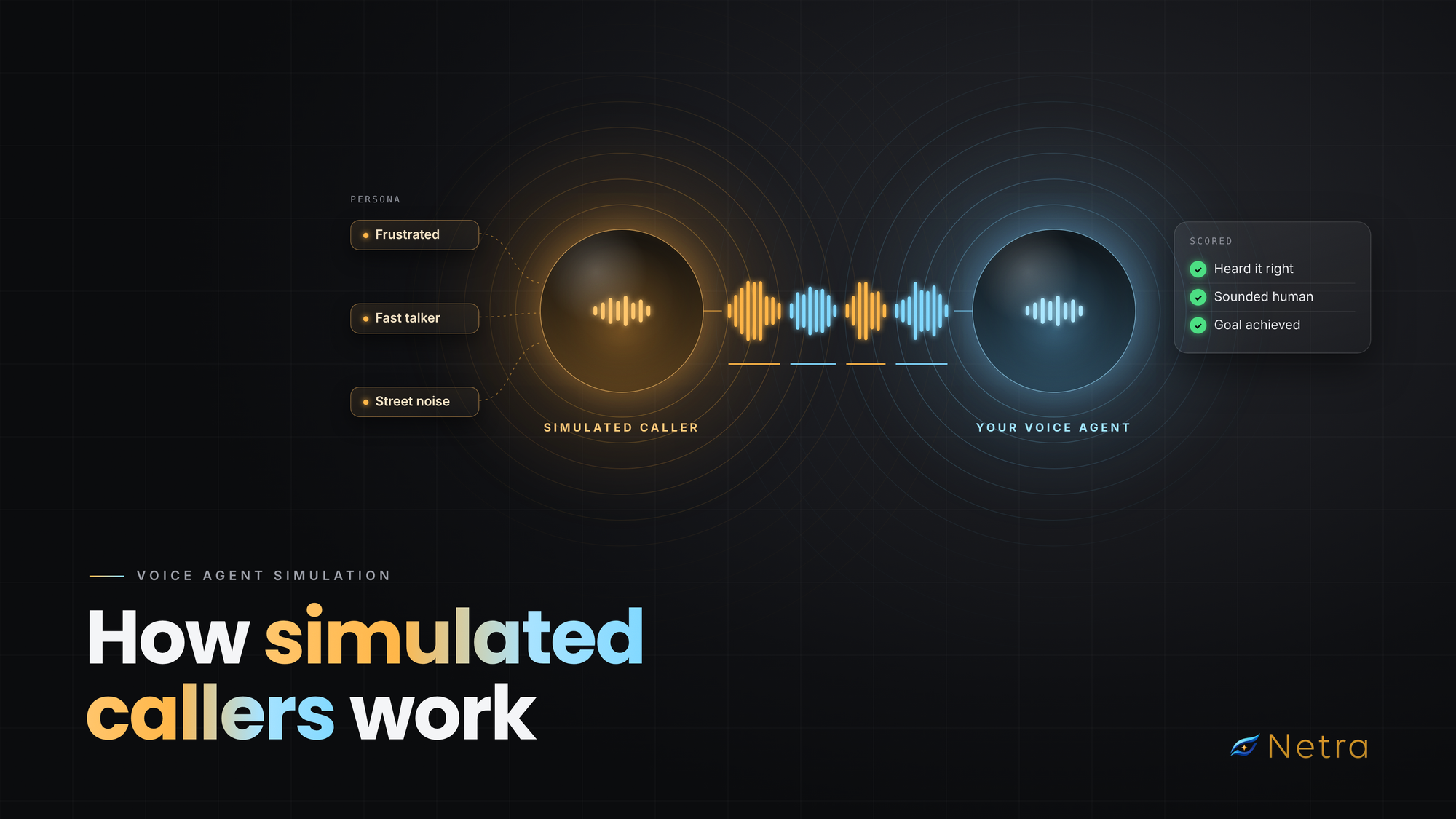
Think of the simulated caller as a second voice agent, built to test yours. It has the same three parts:
- It listens. A speech-to-text (STT) model turns your agent's reply into text.
- It thinks. A reasoning model checks the reply against the caller's goal and what it knows, then decides what to say next, or whether to hang up.
- It speaks. A text-to-speech (TTS) voice says the line with the persona's pace, accent and habits.
Your agent does the same in reverse. The two take turns until the goal is reached, someone gives up, or a limit is hit.
Inside a simulated call: the simulated caller and the voice agent each listen, think, and speak in a loop over a real audio channel
The caller follows a goal, not a script. If your agent asks for a date of birth before the booking ID, the caller adapts. That exposes agents that only work when information arrives in one order, a point LiveKit also makes about task-level simulated users.
You know the ground truth. The system knows exactly what the caller said, so it can compare that with what your agent heard. A live customer call never gives you that.
The test can have its own bugs. If the caller's own STT mishears your agent, the call fails for reasons unrelated to your agent. When a failure looks odd, listen to the recording first.
What Is a Simulated Caller Made Of?
Every simulated caller comes from four inputs. Change one at a time, and you'll know what caused a failure.
The goal is the plot, the persona is the actor, the knowledge is the script they were handed, and the conditions are the set.
Why Should a Simulated Caller Know Less Than You Do?
Because a caller who knows everything will rescue your agent.
Give it the full booking record, and it'll volunteer details your agent forgot to ask for. The call passes, and you learn nothing. Give it only the booking ID and date of birth, and your agent has to ask the right questions. Ask for something it wasn't given, and it says it doesn't know. Now you see whether your agent invents an answer.
Why Is the Default Simulated Caller Too Polite?
Left to its defaults, an AI caller behaves like your team on test day: calm, clear and cooperative.
Research backs this up. An Observe.AI study, Why Synthetic Isn't Real Yet, compared synthetic contact-centre conversations with real ones. Disfluencies like "um", restarts, and trailing off appeared in about 15–30% of real turns but only 1–6% of synthetic ones. Synthetic turns were also more positive, more formal, and more linear, with fewer interruptions and topic changes. It studied generated transcripts, not live calls, but the bias is the same.
Is your simulated caller too nice?
- It always answers the question it was asked, in full
- It never changes its mind halfway through
- It never says "um" or restarts a sentence
- It always has every detail ready
- It always sounds calm, in a quiet room
Ticked more than two? Your tests are easier than your customers. Add a frustrated or confused mood, vague speech, filler words, background noise, and less knowledge.
How Hard Should Your Simulated Callers Be?
Don't start with your hardest caller. Climb a ladder, one rung at a time:
- Baseline. A neutral, clear caller on a quiet line. If this fails, stop and fix it.
- One hard trait. A fast talker, a rambler, or a strong accent, one at a time.
- Hard mood. A frustrated or confused caller, to test tone and de-escalation.
- Real-world noise. Re-run passing calls with café, street, or office noise.
- Everything at once. Fast, frustrated, half the information, busy street.
A failure on rung 5 tells you little until rungs 1– 4 pass.
How Does a Simulated Call End, and What Does the Ending Tell You?
How a call ends is your first clue. These endings match the exit statuses Netra reports.
What Does a Simulated Call Look Like, Turn by Turn?
One short call can test several things at once, and passing doesn’t mean it went well. Here’s an illustrative example. A fast, frustrated caller on a busy street wants to move Thursday’s 10 a.m. appointment. They know their booking ID and date of birth, nothing else.
Tests:hearing a rushed request through traffic noise.
Tests:letters and numbers. “HZ” is easy to mishear as “AZ”.
Tests:the knowledge limit. Does the agent offer another check, or loop?
Tests:a spoken date, said fast.
Tests:a change of mind. Does the agent book the afternoon?
The call passed, but that’s only half the answer. The scores show whether the agent heard “HZ” and the date correctly, replied quickly, sounded natural, and let the caller finish. A call can reach its goal and still feel slow or robotic to the person on the line.
What Can Voice Agent Simulation Catch, and What Can It Miss?
Simulation is a wind tunnel, not a test flight: it finds most problems cheaply, but proves nothing about every weather.
Simulate on every prompt, model, voice, or pipeline change, make a few real calls before launch, then monitor production and turn each real failure into a new scenario. Our voice agent testing checklist covers the full routine.
How Do You Run Voice Agent Simulation in Netra?
Netra runs text and voice simulation on the same platform as tracing and evaluations. For a voice agent:
- Connect your agent. Register a voice agent built on LiveKit or Vapi.
- Create a voice evaluation. Go to Evaluate → Evaluations → New Evaluation and choose Voice.
- Write scenarios. Each has a voice goal, the information the caller can use, optional background noise (café, street, office and more) with adjustable intensity, a turn limit (1–50) and a call limit (0.5–30 minutes).
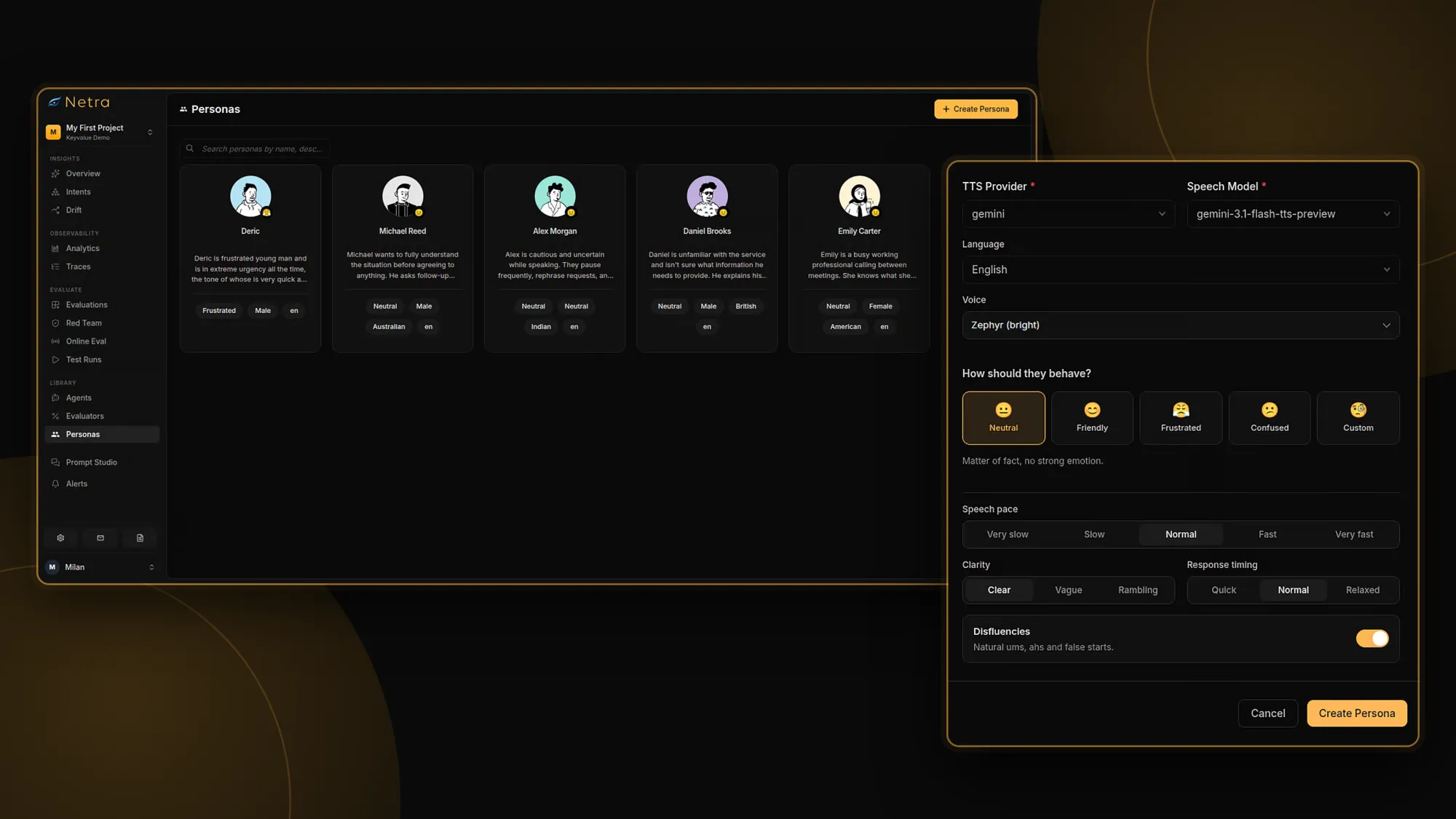
- Choose the caller. Each scenario uses one persona. A persona sets behaviour (neutral, friendly, frustrated, confused or custom), pace, clarity, response timing, disfluencies, language, accent, voice and knowledge as key-value pairs. You also pick the caller's own STT, reasoning model and optional TTS.
- Attach evaluators. Voice evaluators score how your agent hears (Word Error Rate, Time to First Transcript), how it sounds (Humanness, Pronunciation Accuracy) and how it converses (Backchannelling Naturalness, Speaking Percentage). Session evaluators such as Goal Fulfillment score the whole call.
- Review and compare. Each call has a stereo recording synced to the transcript, a trace for every turn, and evaluator cards with a score and a reason. Comparing runs shows which scenarios flipped from pass to fail.
A saved persona stays the same between runs, so a change in results points to your agent, not the caller. The Voice Personas docs cover every setting.
Netra Scenario Run Details: a simulated call replay with transcript next to an evaluation that failed and its reason
What Should You Do Next?
Pick one real call that went wrong last month and turn it into a scenario: the caller's goal, the facts they had, how they sounded and where they were. Run it on rung 1, then climb. It will teach you more than a week of team test calls.
Netra lets you build that caller and score every call in one place. Start free, or read the voice simulation docs.
FAQs
Can you test a voice agent without making real calls?
Yes. With AI call simulation, a simulated caller talks to your agent over an audio channel, so nobody dials in. Each call is recorded, transcribed and scored, and you can re-run the set after every change. Keep a few real calls before launch to check the phone network itself.
What is the difference between a persona and a scenario?
A scenario is what the caller wants and knows, such as moving an appointment with only a booking ID. A persona is who is calling: voice, accent, pace, clarity and mood. Keeping them separate lets you run one scenario with many callers and see which caller breaks your agent.
How realistic are simulated callers?
Realistic enough to catch most hearing, speaking and conversation failures, but cleaner than real people by default. Research found synthetic dialogue has far fewer filler words and is more polite and formal than real calls. Close the gap with difficult personas, disfluencies, background noise and limited caller knowledge.
Do you still need real test calls after simulation?
Yes, a few. Simulation doesn't test real phone networks, carriers or call routing, and it can't produce every strange thing a person does. Simulate on every change, make a handful of real calls before launch, then monitor production.
What is the difference between text and voice simulation?
Text simulation tests conversation logic: goals, memory, tool use and answers. Voice simulation runs the conversation over real audio, so it also catches mishearing, mispronunciation, slow replies and interruptions. Use text to iterate fast and voice for what callers hear. See our AI agent simulation guide.