Highlights
- A voice agent can fail in three places: how it hears, how it thinks, and how it speaks. Test all three.
- Transcripts hide audio failures such as mispronounced names, slow first replies, and talking over the caller.
- AI call simulation with varied caller personas and background noise lets you test every release before a real customer calls.
- Testing catches problems before launch. Monitoring catches them on live calls. You need both, ideally in one place.
The transcript said the call went fine.
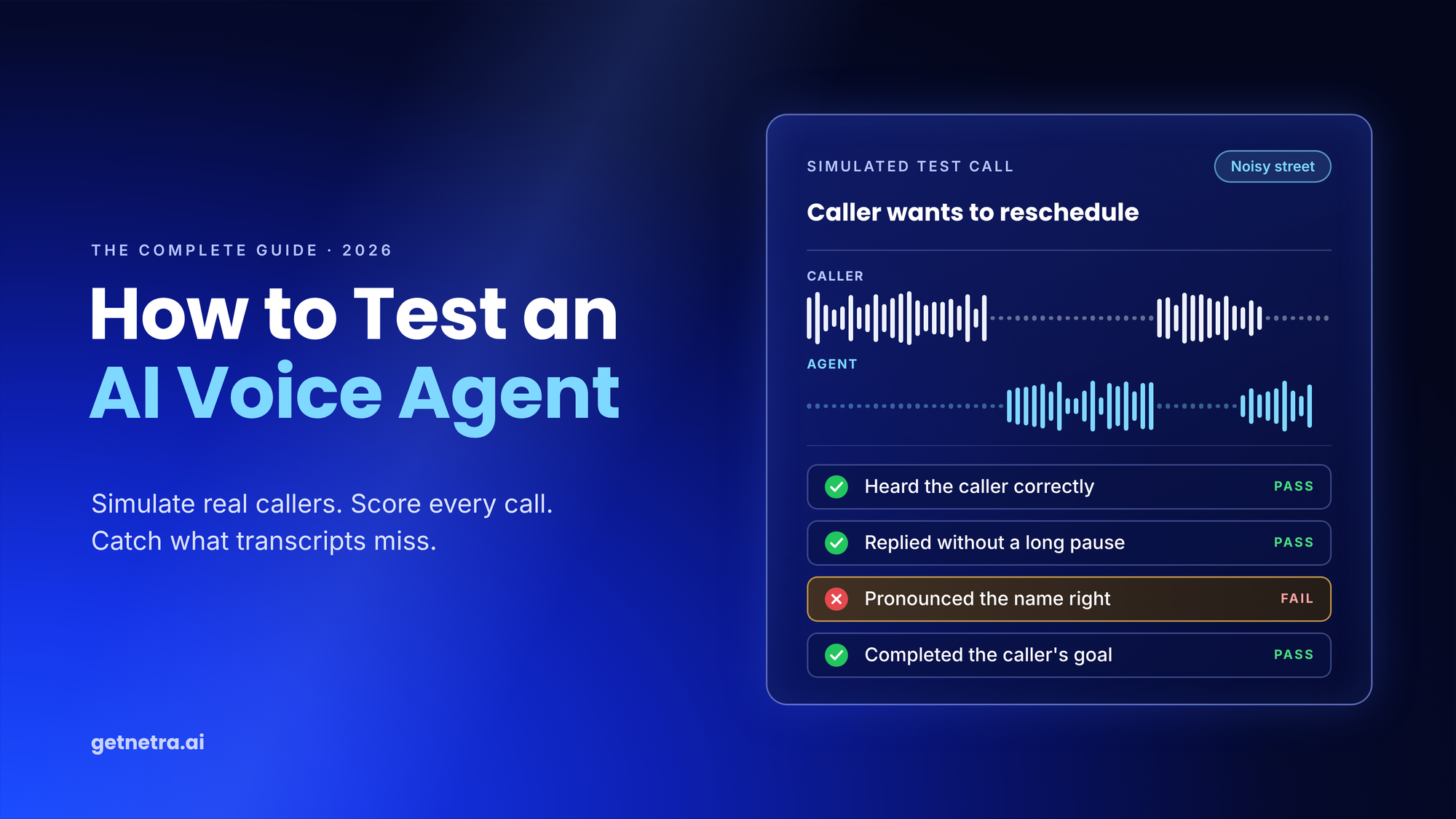
The recording told a different story. The agent paused too long before answering. It said the customer's name wrong. Halfway through, it cut the caller off.
None of that shows up in text, which is why AI voice agent testing needs its own approach. The gap is real: in Deepgram's 2025 survey, only 21% of business leaders were very satisfied with their voice agent technology. This guide gives you a framework, a process and a starter test suite.
What Is AI Voice Agent Testing?
AI voice agent testing is the process of running realistic calls against a voice agent and scoring how well it hears the caller, reasons about the request, and responds in speech, before real customers reach it.
It is a branch of AI agent evaluation, with three extra challenges:
- Real-time audio. Every reply has to arrive fast enough to feel natural.
- Messy input. Accents, background noise and callers who change their mind mid-sentence.
- Three models in a chain. Speech-to-text (STT), a reasoning LLM and text-to-speech (TTS). One weak link breaks the call.
The foundations of text agent evaluation still apply. Voice adds the audio layer on top.
Why Can't You Test a Voice Agent With Transcripts Alone?
A transcript shows what was said, not how it sounded or when. Problems you only catch by listening:
- Names, addresses, or product terms pronounced wrongly
- A long pause before the first reply
- Talking over the caller or cutting them off
- A flat, robotic tone in an emotional moment
- An accidental switch to another language
Timing matters. People in conversation usually reply within a few hundred milliseconds, a pattern a PNAS study found across 10 languages.
The transcript itself can also be wrong. Roughly 1% of Whisper transcriptions contained hallucinated phrases in one study. Read only the text, and you may be grading words nobody said.
What Should You Test in an AI Voice Agent?
Good voice agent evaluation checks every stage of the call, not just the final answer. We group it into three questions: the Hear, Think, Speak framework.
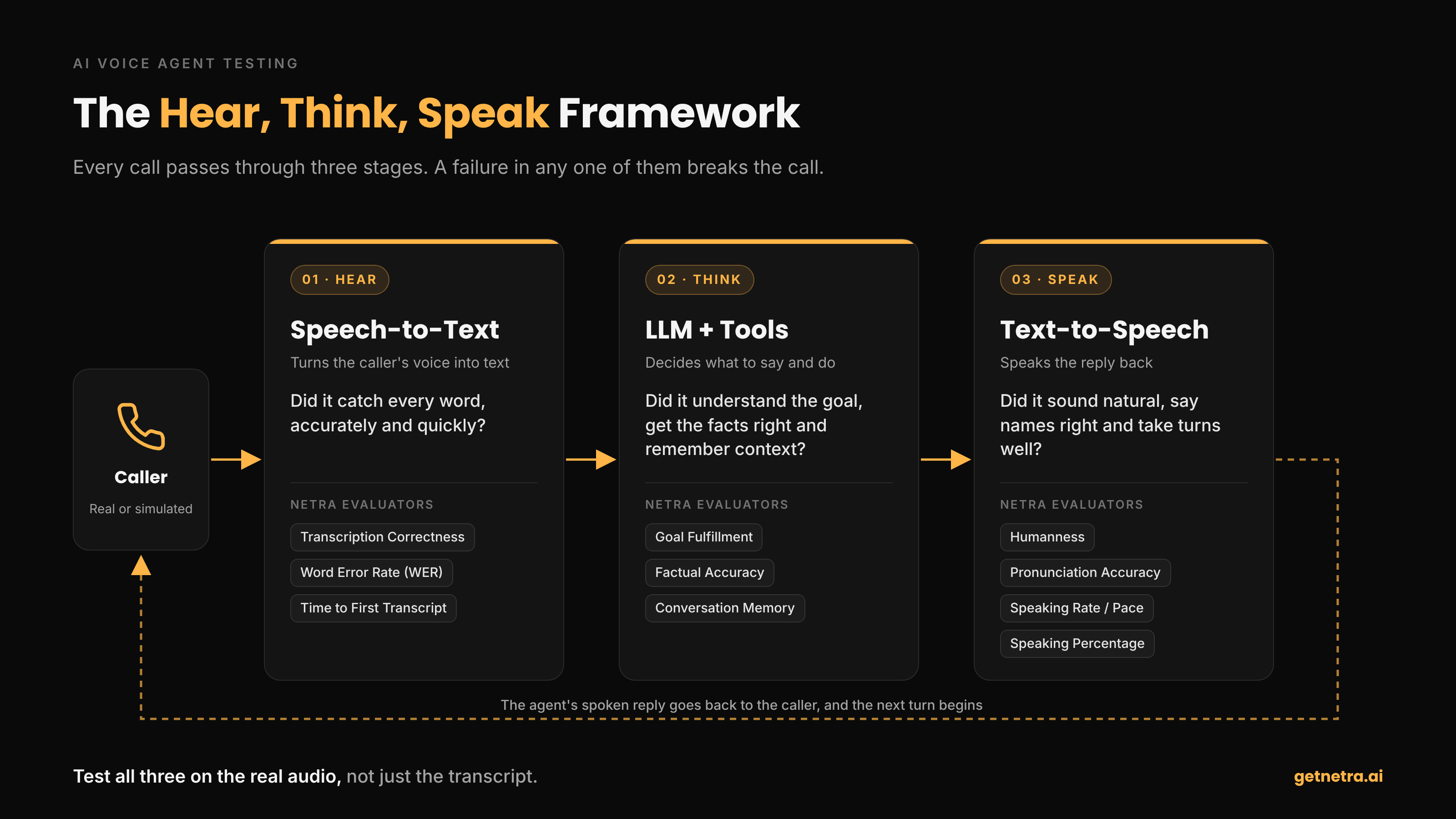
How Does Your Agent Hear?
Did speech-to-text capture the caller's words correctly and quickly?
How Does Your Agent Think?
Did the agent understand the goal, give correct answers, call the right tools and stay on topic?
How Does Your Agent Speak?
Did it sound natural, pronounce words correctly, keep a comfortable pace and take turns politely?
How each question maps to Netra evaluators and their default pass criteria:
| Stage | What can go wrong | Netra evaluator | How it is scored | Default pass |
|---|---|---|---|---|
| Hear | Words misheard | Transcription Correctness, Word Error Rate | Audio model (LALM) | ≥ 0.7 (Transcription Correctness) |
| Hear | Laggy start | Time to First Transcript | Rule | Within 1 second |
| Think | Goal missed, wrong facts, lost context | Goal Fulfillment, Factual Accuracy, Conversation Memory, Guideline Adherence | LLM judge on the transcript | ≥ 0.6 |
| Speak | Robotic voice | Humanness | Audio model | ≥ 0.7 |
| Speak | Names said wrong | Pronunciation Accuracy | Audio model | ≥ 0.7 |
| Speak | Too fast or too slow | Speaking Rate | Rule | 2.5 to 4 words per second |
| Speak | Wrong language | Language Accuracy | Audio model | Pass or fail |
| Speak | Flat tone, awkward turn-taking | Expressiveness, Backchannelling Naturalness | Audio model | ≥ 0.7 |
| Speak | Talks too much or too little | Speaking Percentage | Rule | 30% to 60% of talk time |
Pair voice and text evaluators on the same call. Humanness tells you the answer sounded right. Factual Accuracy tells you it was right.
How Do You Test an AI Voice Agent, Step by Step?
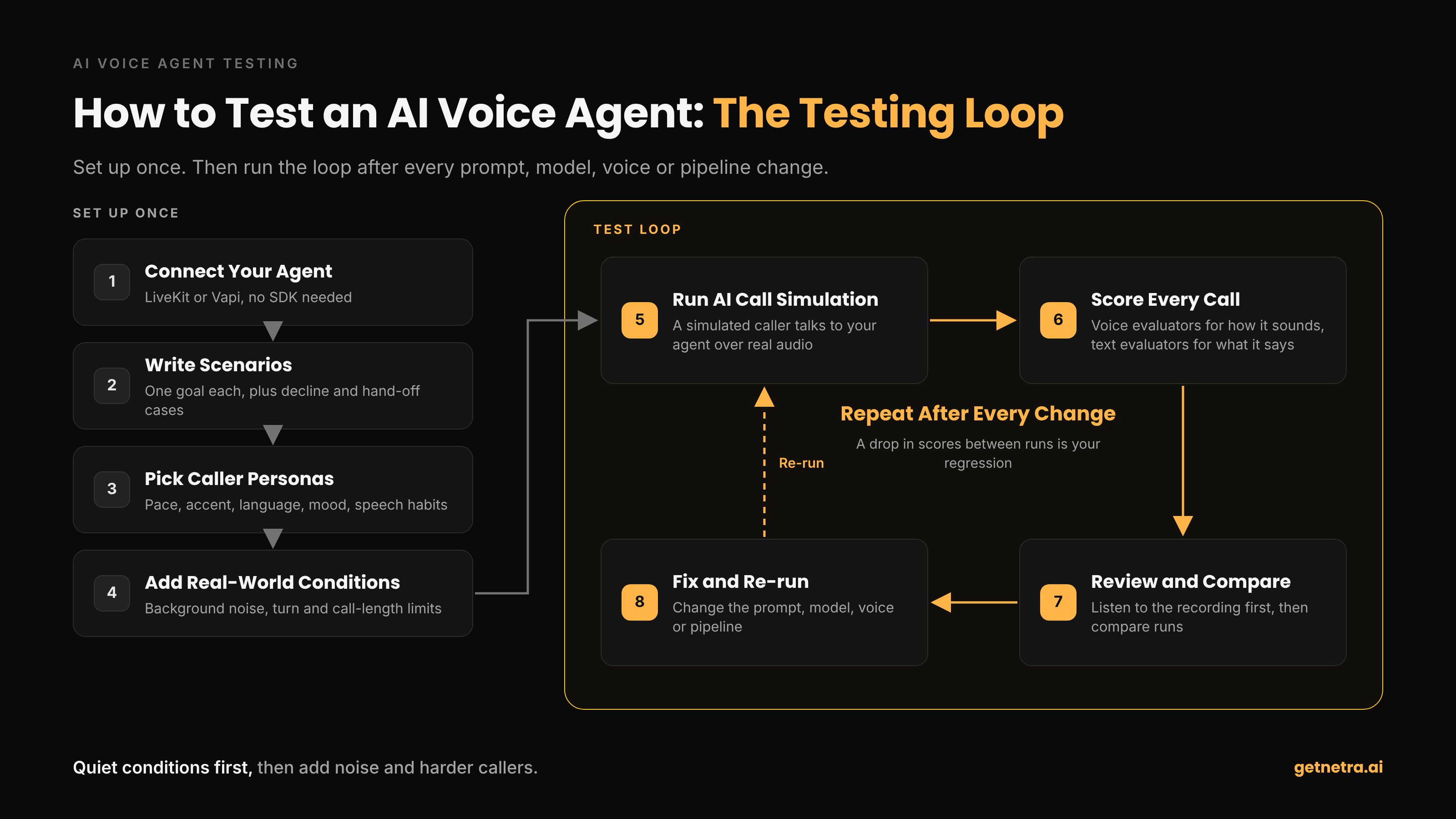
Step 1: How Do You Connect Your Voice Agent?
Register the agent you already run. Netra connects to LiveKit agents and Vapi assistants with a few credentials, and no SDK is needed to run simulations. LiveKit's own testing docs cover unit-level checks you can run alongside.
Step 2: What Scenarios Should You Write?
Give each scenario one clear goal, and include cases where the right move is to decline or hand over to a human. A starter suite:
| Scenario | What it checks | |
|---|---|---|
| 1 | Simple request, calm caller | Baseline: does the happy path work? |
| 2 | Caller spells a name or reads a number | Hearing accuracy, pronunciation on read-back |
| 3 | Vague request that needs a follow-up question | Information gathering |
| 4 | Question the agent should not answer | Declining safely, no made-up answers |
| 5 | Caller asks for a human | Escalation |
| 6 | Frustrated caller | Tone, de-escalation |
| 7 | Fast talker in a noisy street | STT under pressure |
| 8 | Caller with a non-native accent | Transcription across accents |
| 9 | Caller interrupts mid-answer | Turn-taking |
| 10 | Caller changes their mind halfway | Context and memory |
Step 3: Which Caller Personas Should You Test?
A persona sets who is calling: voice, accent, language, pace, clarity, response timing and speech habits. Keep a neutral persona as your baseline, then add harder callers.
| Persona setting | What it stresses |
|---|---|
| Fast pace | Speech-to-text |
| Vague or rambling speech | Clarifying questions |
| Quick or relaxed response timing | Turn-taking |
| Hesitations and filler words | Patience, not cutting in |
| Accent and language | Transcription and Language Accuracy |
| Frustrated or confused caller | Tone and de-escalation |
| Custom persona | Your own edge cases |
Step 4: How Do You Add Real-World Conditions?
Test in quiet conditions first. Then add background noise, such as a café, street or office, and turn up the intensity. Set limits on conversation turns (1 to 50) and call length (30 seconds to 30 minutes) so broken loops end cleanly.
Step 5: How Do You Run an AI Call Simulation?
In an AI call simulation, a simulated caller talks to your agent over a real audio channel. Netra places the call, records it, transcribes it, and runs your evaluators, so no one has to dial in. For lessons on multi-turn testing, read Beyond Single Turns.
Step 6: How Do You Review Results and Catch Regressions?
Play each call's stereo recording, synced to the transcript, and replay single turns. Listen before you read: audio often explains a score that looks wrong on paper. Each run shows pass rate, average score, cost, latency, and duration.
Re-run the same suite after every prompt, model, voice, or pipeline change, and compare runs whenever you switch STT or TTS providers. A drop in scores is your regression.
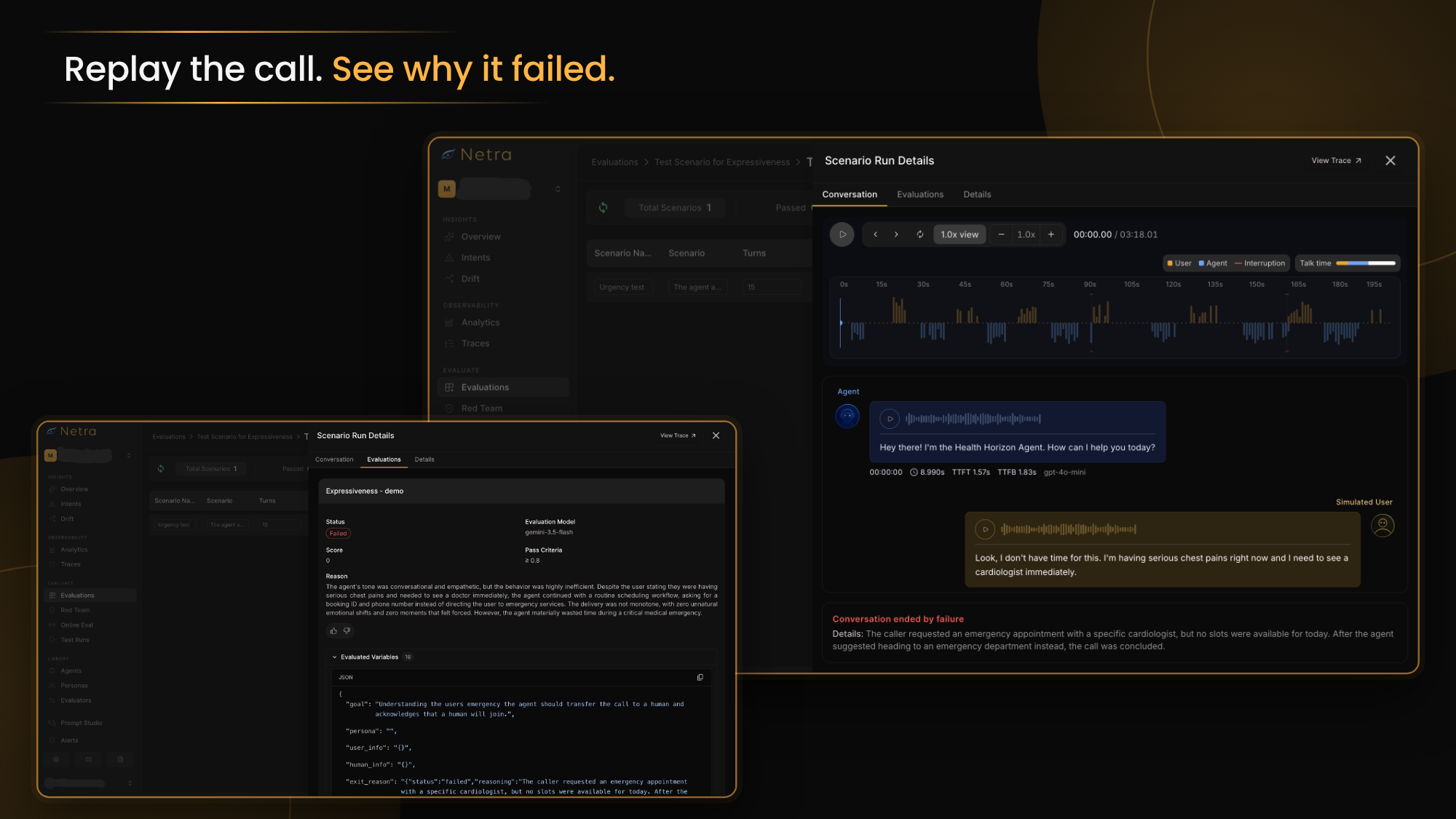
How Do You Find What Broke?
Scores tell you that a call failed. This tells you where:
| Symptom | Likely stage | What to check |
|---|---|---|
| Word Error Rate rises in noisy scenarios | Hear (STT) | STT model and noise handling |
| Low Humanness or Expressiveness | Speak (TTS) | Voice choice, prompt phrasing |
| Time to First Transcript fails | Hear (streaming) | Streaming configuration |
| Backchannelling fails | Speak (turn-taking) | Agent cutting callers off |
| Speaking Percentage out of range | Think (conversation design) | Agent dominating, or too passive |
Fix latency first. Time to First Transcript problems compound, so solve them before tuning content quality.
What Is the Difference Between Voice Agent Testing and Voice Agent Monitoring?
Testing uses simulated calls before a release. Voice agent monitoring watches real calls after it. One tells you a change is safe to ship; the other tells you what callers actually experience.
| Testing | Monitoring | |
|---|---|---|
| When | Before every release | After launch, all the time |
| Calls | Simulated callers and scenarios | Real customer calls |
| Goal | Catch failures early | Spot problems and drift in production |
| Output | Scores, pass rates, regressions | Traces, latency, alerts |
What Does Voice AI Observability Add?
Voice AI observability shows what happened inside a live call. With LiveKit, a single Netra.init() call captures a span for each stage, from speech-to-text through the LLM and tools to text-to-speech, plus a live transcript and stereo recording. You can see exactly which stage slowed a reply down. Vapi call data reaches Netra after the call through a webhook. More in our AI agent observability guide.
What Should You Look for in Voice Agent Testing Tools?
Before you choose among voice agent testing tools, check if the tool:
- Places real calls over an audio channel
- Scores the audio itself, not only the transcript
- Controls personas, background noise and call limits
- Connects to your stack, such as LiveKit or Vapi
- Compares runs over time
- Traces production calls in the same place
How Does Netra Help You Test Voice Agents?
Netra brings simulation, evaluation and observability for voice agents into one platform, the same one that covers your text agents.
- Simulate every caller. Reusable personas, from a fast talker to a frustrated caller on a noisy line, run against your LiveKit or Vapi agent.
- Score how it sounds and what it says. Audio-scored evaluators for hearing and speaking sit alongside text evaluators for goals, accuracy and tool use.
- Trace every call. Each stage of a live call, from speech-to-text to text-to-speech, gets its own timing, plus the full recording and transcript.
- Close the loop. Use what you hear in production calls to write new scenarios, then re-run before the next release.
Netra is built by KeyValue, a team that has deployed more than 25 AI agents in production, and is SOC 2 Type II, HIPAA, and GDPR compliant.
Explore Netra for voice agents →
What Should You Do Next?
Pick your three most common call types. Write one scenario for each, run them with a neutral caller and a fast talker on a noisy line, and score how your agent hears, thinks and speaks.
AI voice agent testing works best as a habit, not a launch-day task.
Want to see how your voice agent performs against real callers? Talk to the Netra team or start free.
FAQs
1. How do you test an AI voice agent without making real calls?
Use AI call simulation. A simulated caller with a set persona talks to your agent over an audio channel, and every call is recorded, transcribed and scored. You can run dozens of scenarios before a single customer dials in.
2. What metrics matter most in voice agent evaluation?
Start with Humanness (does it sound natural?) and Transcription Correctness (did it hear correctly?). Then add Goal Fulfillment for task success, Time to First Transcript for speed and Pronunciation Accuracy if your agent says names or product terms.
3. What is a good latency for an AI voice agent?
Aim to feel like a person, who usually replies within a few hundred milliseconds. Measure each stage separately so you know what to fix. Netra's default for Time to First Transcript is one second, and you can tighten it.
4. How do you test an AI voice agent with different accents?
Create personas with different accents, languages, and speaking speeds, then run the same scenarios with each. Watch Transcription Correctness and Word Error Rate for hearing issues, and Language Accuracy to make sure the agent replies in the expected language.
5. How often should you run voice agent evals?
Run voice agent evals after every change to the prompt, model, voice or pipeline. After launch, keep a regular schedule and add scenarios when production calls reveal a gap. Like any AI agent evaluation, it only works if it is routine.
6. How do you stop an AI voice agent from making up answers?
Write scenarios with questions the agent should not answer, and give the simulated caller only limited facts. Score the transcript with Factual Accuracy and Guideline Adherence, and check that the agent declines or hands over to a human instead of guessing.