Highlights
- Online evaluation continuously measures AI agent quality using real production interactions, helping teams catch failures that pre-release test datasets miss.
- LangChain's 2026 State of Agent Engineering report found that 52.4% of surveyed organizations use offline evaluations, while only 37.3% use online evaluations.
- A reliable online evaluation workflow combines production traces, relevant evaluators, traffic sampling, quality thresholds, and actionable alerts.
- Production failures should feed back into offline regression tests, so the same issues are less likely to return in future releases.
- Netra connects online evaluation with observability, reusable evaluators, quality alerts, and pre-release testing to help teams continuously improve agent reliability.
Your AI Agent Passed Every Test. So Why Is It Failing in Production?
An AI agent performs well across every test case before release. The responses are accurate, the evaluators return good scores, and the team ships with confidence.
Three weeks later, something changes.
Users start phrasing familiar requests differently. The agent struggles with these variations, returns inconsistent answers, and occasionally chooses the wrong tool.
Nothing crashes. The application remains available. The original test suite still passes.
But users are getting poor results, and the team only discovers the problem when complaints start coming in.
This is one of the biggest limitations of relying entirely on pre-release testing. A fixed dataset can verify how an agent handles known scenarios, but it cannot predict every request the agent will encounter in production.
Online evaluation closes that gap by continuously measuring how an agent performs against real user interactions after deployment.
It gives engineering teams a way to identify quality regressions while they are happening, rather than discovering them through support tickets weeks later.
What Is Online Evaluation for AI Agents?
Online evaluation is the process of automatically assessing AI agent behavior using real production interactions.
Instead of running evaluators only against predefined test cases, online evaluation applies configured quality checks to production traces as the agent handles requests.
For example, a customer support agent might be evaluated for answer correctness, policy compliance, tool selection, and response relevance.
The same evaluation criteria used before release can be applied to real customer conversations, even when those conversations contain scenarios nobody anticipated during testing.
Online evaluation can use LLM-as-a-Judge for semantic quality, code evaluators for deterministic requirements, and other predefined checks depending on the application.
The important difference is the source of the data being evaluated.
Offline vs. online evaluation
Offline evaluation answers whether an agent meets quality requirements on cases the team already knows.
Online evaluation answers whether those requirements are still being met as real usage evolves.
Neither replaces the other.
Why AI Agents Need Continuous Evaluation After Deployment
Production introduces uncertainty that even a well-designed test dataset cannot completely capture.
Users ask unexpected questions. Retrieved documents change. External APIs behave differently. A model update can alter how an agent interprets instructions.
Any of these changes can affect response quality without producing a conventional application error.
The 2026 State of Agent Engineering report by LangChain highlights the gap between testing and production monitoring.
Among more than 1,300 surveyed professionals and organizations:
- 52.4% reported using offline evaluations on test datasets.
- 37.3% reported using online evaluations.
- Among organizations already running agents in production, online evaluation adoption reached 44.8%.
The findings suggest that production evaluation is becoming more common, but it is still less widely adopted than pre-release testing.
The challenge is that many AI failures do not appear as technical incidents.
An agent might return a response with a successful HTTP status, complete the workflow, and still provide incorrect information.
Without continuously evaluating the output or behavior, that failure can go unnoticed.
Online evaluation creates a quality signal alongside conventional operational metrics such as latency, error rates, and cost.
How to Set Up Online Evaluation for AI Agents
A useful online evaluation setup needs more than a dashboard displaying average scores.
Teams need to decide what to evaluate, which traffic to include, how much to sample, and what should happen when quality declines.
Here are five steps to establish that workflow.
1. Start with the evaluators that matter
Online evaluation does not necessarily require creating a new evaluator library.
If the team already evaluates answer correctness, tool selection, or policy compliance before deployment, those criteria can also be applied to production interactions when the required data is available.
The first step is selecting the checks that represent real product requirements.
For a customer support agent, these might include answer relevance, policy compliance, and whether the correct tool was selected.
For a retrieval-augmented generation (RAG) agent, faithfulness to retrieved context may matter more.
Avoid evaluating everything simply because an evaluator is available.
Start with the failures that would most affect users, business workflows, or compliance.
2. Decide which production traffic to evaluate
Evaluating every production request may be practical for a low-volume application, but it can become expensive as traffic increases.
Sampling provides a way to control evaluation costs while maintaining visibility into production quality.
For example, a team might start by evaluating 10% of eligible conversations and increase coverage after a major release.
That percentage is illustrative, not a universal recommendation.
Sampling should account for traffic volume and the likelihood of detecting important failures. A small random sample can miss rare but serious issues.
Teams should also consider evaluating sensitive workflows separately, such as payment actions, account changes, or other high-impact operations.
A useful sampling strategy balances three factors: coverage, evaluation cost, and the consequences of missing a failure.
3. Define meaningful quality thresholds
An evaluation score becomes useful when the team knows what to do with it.
Suppose a support agent typically passes its answer relevance checks 95% of the time.
If that rate drops to 80%, it may indicate a regression. But the team still needs to understand whether the change reflects a genuine quality problem, normal variation, or a shift in the types of requests being evaluated.
Thresholds should be established using a representative baseline, expected traffic patterns, and the importance of each evaluator.
A high-risk policy violation might deserve investigation after a single confirmed failure. A minor change in conversational tone may require a sustained pattern before action is necessary.
Avoid relying only on an overall pass rate. One improving metric can mask a serious decline in another.
For low-volume agents, consider the sample size and the number of failed cases before interpreting percentage changes.
4. Investigate failed evaluations using traces
Online evaluation tells you when an interaction failed a quality check.
It does not always explain why.
Consider an agent that returns an incorrect answer about a customer's subscription coverage.
The failure could originate from several places:
- The agent retrieved an outdated document.
- The correct information was retrieved but interpreted incorrectly.
- A tool returned incomplete data.
- The agent followed the wrong workflow.
An evaluation score identifies the quality issue. An execution trace helps the team investigate the sequence of events that produced it.
This distinction matters because the appropriate fix depends on the cause.
A retrieval problem might require changes to the knowledge source or retrieval pipeline. A tool-selection failure might need better instructions or application logic.
The goal is to move from identifying a poor response to understanding the behavior responsible for it.
5. Turn production failures into regression tests
One of the most valuable outcomes of online evaluation is discovering cases the original test suite missed.
Suppose a production interaction reveals that an agent misunderstands a particular type of refund request.
Once the issue is confirmed, the team can preserve the interaction as a regression test.
After updating the agent, they rerun the test to verify that the problem is fixed.
The new case remains in the offline dataset so future changes can be checked against it.
Over time, this creates a continuous improvement cycle:
Evaluate production → Identify failure → Investigate → Fix → Add regression test → Verify
Instead of relying on a fixed collection of anticipated scenarios, the test dataset evolves with actual user behavior.
How Does Netra Handle Online Evaluation?
Netra brings online evaluation into the same platform used for observability and pre-release evaluation.
Its Online Evaluation capability applies configured evaluators to production traces, helping teams monitor quality without manually recreating real interactions as synthetic test cases.
Evaluate live production traffic
Netra allows teams to evaluate selected production traces using the same evaluator framework available for offline testing.
Teams can scope evaluations to particular agents, filter relevant traffic, and configure sampling.
Netra supports sampling rates from 1% to 100%, allowing teams to adjust coverage according to traffic volume and evaluation requirements.
The resulting scores provide a view of agent quality under real operating conditions.
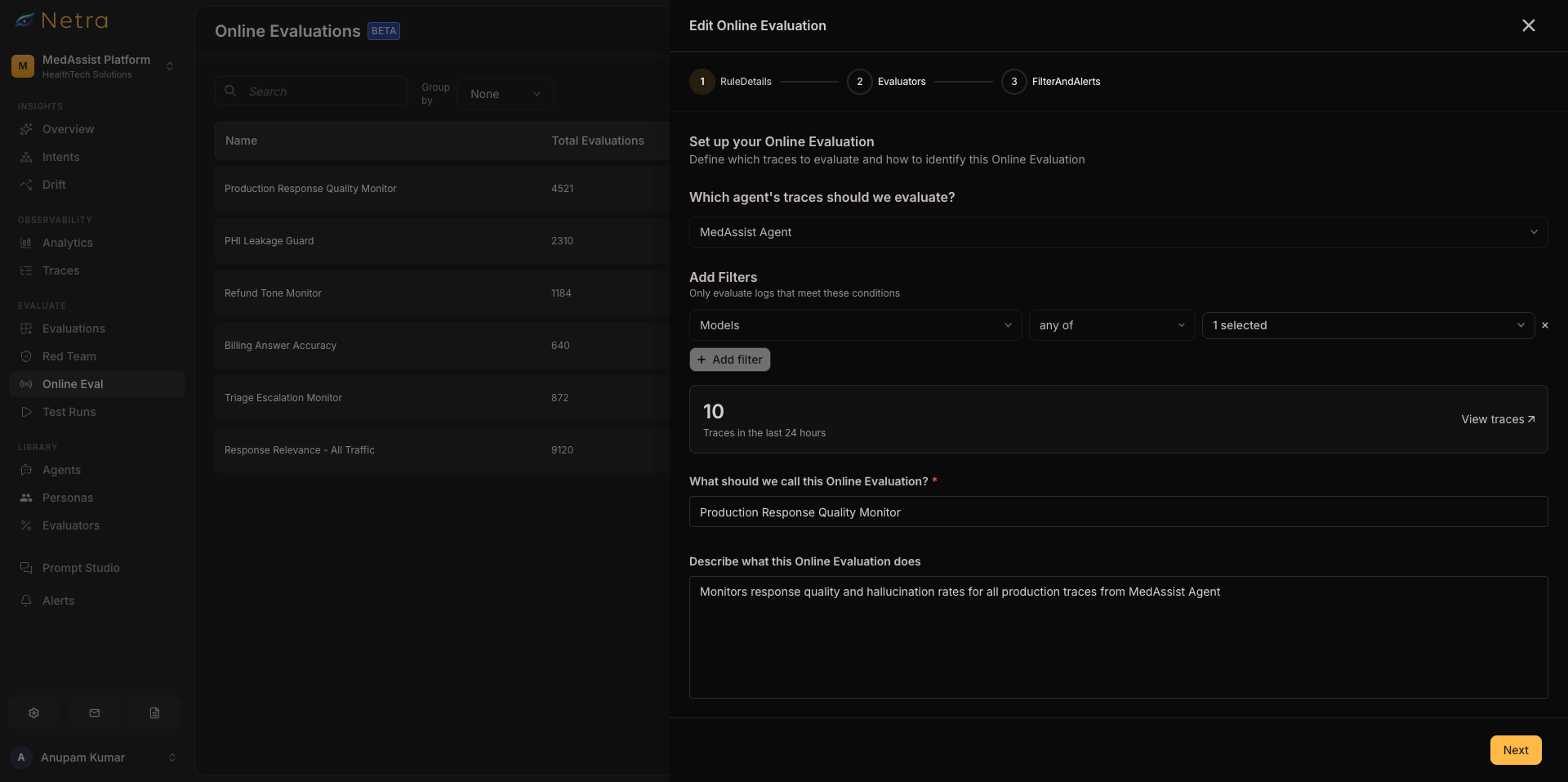
Show: The Netra Online Evaluation configuration screen displaying agent selection, configured evaluators, and production traffic sampling settings.
Suggested alt text: Netra Online Evaluation configuration showing agent selection, evaluators, and sampling settings.
Track quality across production workflows
Netra supports monitoring overall evaluation performance and examining results across agents, routes, model versions, and other relevant dimensions.
This helps teams identify where a quality decline is happening rather than relying only on an aggregate score.
For example, an agent may perform well overall while repeatedly failing requests associated with one specific workflow.
Examining those results separately helps narrow the investigation.
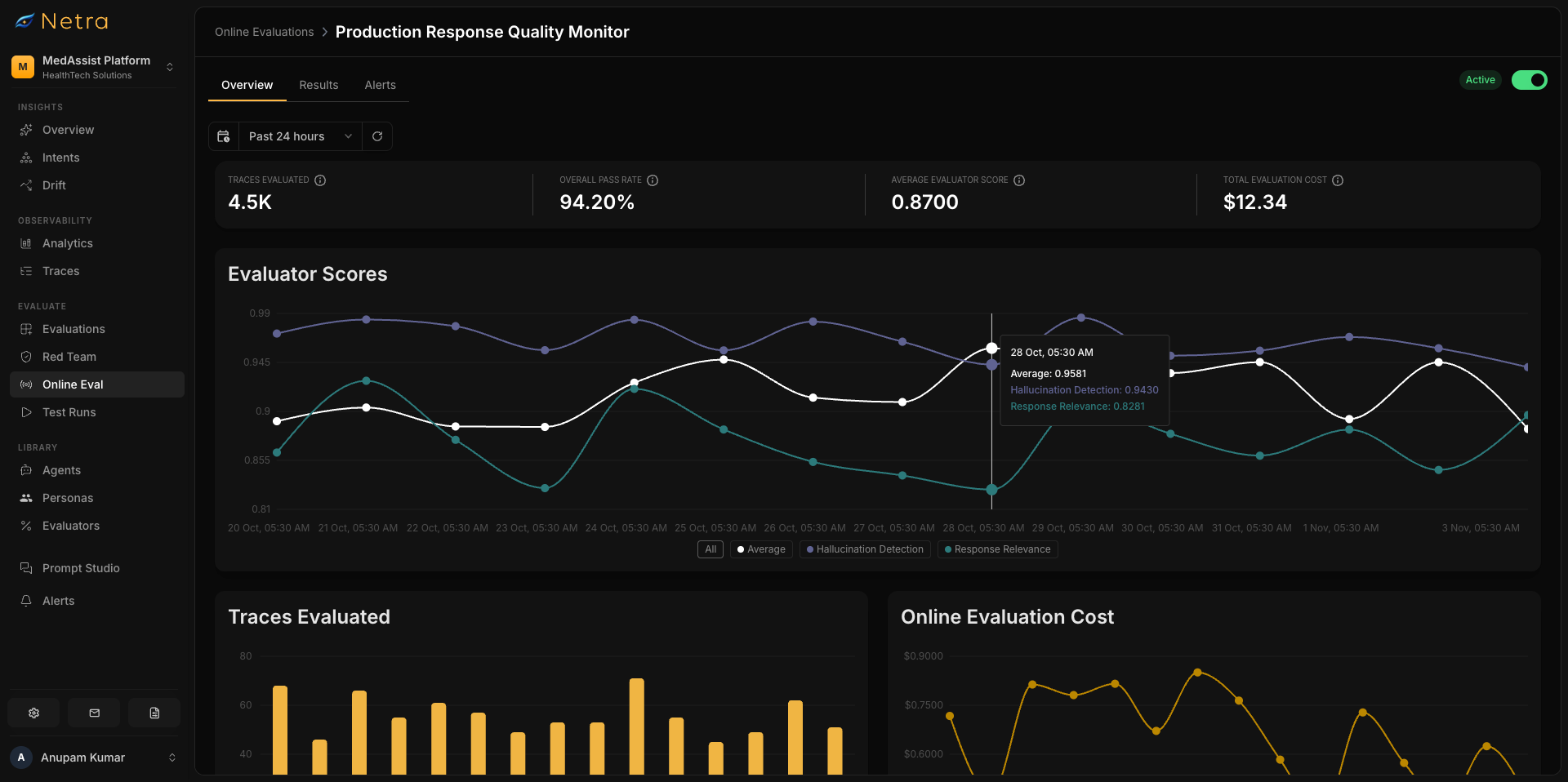
Show: The Netra production evaluation results screen displaying overall pass rates, evaluator-level results, and a failed evaluation linked to its execution trace.
Suggested alt text: Netra production evaluation results showing pass rates, evaluator scores, and a failed AI agent execution trace.
Receive alerts when quality declines
Netra's Alerts capabilities support notifications when online evaluation quality crosses configured thresholds.
Teams can monitor overall pass rates or evaluator-specific results and route notifications through supported channels, including Slack and email.
This helps turn quality regressions into issues someone can investigate rather than leaving them buried in a dashboard.
Connect results to execution traces
When an evaluation identifies a failed interaction, Netra's observability capabilities help the team inspect the associated execution.
Engineers can review model calls, tool activity, and relevant intermediate operations to investigate what went wrong.
This connection between evaluation results and traces makes it easier to distinguish an incorrect answer from the underlying issue that caused it.
Improve future releases with real production cases
Netra also supports converting relevant production traces into evaluation datasets.
A failure identified during online evaluation can become a reusable test case for future releases.
Teams can then run offline evaluations against those cases before shipping prompt, model, or application changes.
This creates a connection between production monitoring and pre-release testing.
Should Online Evaluation Be Connected to CI/CD?
Yes, but the two serve different purposes.
Online evaluation measures the quality of interactions after an agent has been deployed.
CI/CD evaluation gates check a candidate release against defined quality requirements before deployment.
For example, a production issue might reveal that an agent handles cancellation requests incorrectly.
The team adds that case to its offline regression suite, fixes the behavior, and configures its deployment pipeline to run the suite before future releases.
If the updated agent fails the required threshold, the CI gate can block the release.
Online evaluation discovers new problems. Offline regression tests and CI gates help prevent those problems from returning.
Netra supports both continuous production evaluation and pre-release quality gates, allowing teams to use production findings to strengthen their deployment process.
For a broader explanation of this testing lifecycle, see AI Agent Evaluation: A Guide to Testing Across Production.
Continuous Evaluation Is How Production Quality Stays Measurable
A passing test run is useful, but it represents how an agent performed against a particular set of scenarios at a particular time.
Production keeps changing.
Users introduce unexpected requests, integrations evolve, and small changes can affect how agents behave.
Online evaluation helps teams recognize those changes while they are happening.
The most useful setup connects quality scores with execution traces, meaningful thresholds, and regression tests that improve with each release.
That way, production failures become opportunities to strengthen the agent rather than problems that repeatedly catch the team by surprise.
Explore Netra's Online Evaluation or talk to our team to see how continuous production evaluation fits into your agent testing workflow.
FAQs
What is online evaluation for AI agents?
Online evaluation is the continuous assessment of AI agent behavior using real production interactions. It applies configured evaluators to production data to identify issues involving response quality, safety, tool use, or other requirements. It helps teams detect failures that may not appear in pre-release testing.
What is the difference between online and offline evaluation?
Offline evaluation tests predefined or curated cases, usually before deployment. Online evaluation examines actual production interactions after deployment. Offline testing is useful for catching known regressions, while online evaluation helps discover unexpected failures and changing behavior.
Do I need to evaluate every production request?
No. Teams can sample production traffic to balance quality coverage with evaluation costs. The right sampling rate depends on traffic volume, application risk, and the frequency of failures being investigated. High-impact workflows may require more extensive monitoring than routine interactions.
What metrics should I monitor during online evaluation?
Relevant metrics depend on the agent. Common examples include evaluator pass rates, answer relevance, faithfulness, tool-selection correctness, policy compliance, and task completion. Operational metrics such as latency, cost, and errors provide additional context but do not replace quality evaluation.
Can online evaluation detect AI agent drift?
Online evaluation can help identify changes in agent quality over time, including declining pass rates or recurring evaluator failures. However, identifying the cause requires further investigation. Changes in user behavior, retrieval data, models, and application logic can all influence the results.
Does online evaluation replace CI/CD testing?
No. Online evaluation identifies issues in deployed systems, while CI/CD testing checks candidate releases before they ship. Production failures can be added to offline regression datasets so future releases are tested against those cases before deployment.