Highlights
- AI test case generation uses artificial intelligence to create testing scenarios from prompts, requirements, and supporting documents.
- Netra supports prompt-based generation and advanced workflows using agent context, documents, test paths, and test-case counts.
- Automatic test case generation helps teams cover happy paths, edge cases, invalid requests, and policy restrictions without writing every scenario manually.
- Netra can suggest relevant evaluators to help teams assess generated test cases.
- Reviewed cases can become reusable evaluation datasets for detecting regressions after prompt, model, or workflow changes.
Your AI Agent Passed Every Test. But Did You Test Enough?
Your AI agent answers common questions correctly. It calls the right tools, follows instructions, and completes every scenario in your test dataset.
Then a real user asks something unexpected.
They leave out important information, make an ambiguous request, or ask the agent to perform an action outside its permissions.
Suddenly, the agent that passed testing starts making mistakes.
The problem isn't always that the agent wasn't tested. It's that the test cases didn't cover enough of the ways users could interact with it.
Creating comprehensive test datasets manually takes time. Engineers need to anticipate user behavior, write scenarios, define expected outcomes, and update tests whenever an agent changes.
Automatic test case generation helps teams expand testing coverage without writing every case from scratch.
With Netra, teams can generate cases from prompts, documents, and agent context, then evaluate the results to identify potential failures before deployment.
What Is AI Test Case Generation?
AI test case generation uses artificial intelligence to create testing scenarios based on requirements, prompts, or supporting documents.
For AI agents, these scenarios help evaluate how the system handles user requests, follows instructions, selects tools, and responds to unexpected conditions.
Consider a customer support agent.
A basic test case might be:
Input: "What is your refund policy?"
Expected behavior: Explain the applicable refund policy accurately.
That's useful, but what happens when a customer requests a refund outside the allowed period or provides incomplete order details?
AI-powered test case generation helps teams explore these additional scenarios.
How does AI test case generation work?
Test case generation using AI typically follows four steps:
- Provide context: Describe the agent, its requirements, and expected behavior.
- Generate cases: AI proposes scenarios covering different inputs and conditions.
- Review coverage: Engineers validate the cases and expected outcomes.
- Run evaluations: Execute the cases and measure agent performance.
The objective isn't generating the largest possible dataset. It's creating meaningful scenarios that reveal how an agent behaves under different conditions.
What Types of AI Agent Test Cases Can You Generate?
Unlike conventional software, AI agents interpret natural language, make decisions, retrieve information, and execute multi-step workflows.
Automated test case generation can help teams explore situations beyond straightforward requests.
These scenarios help teams uncover gaps that may not appear in a small manually created dataset.
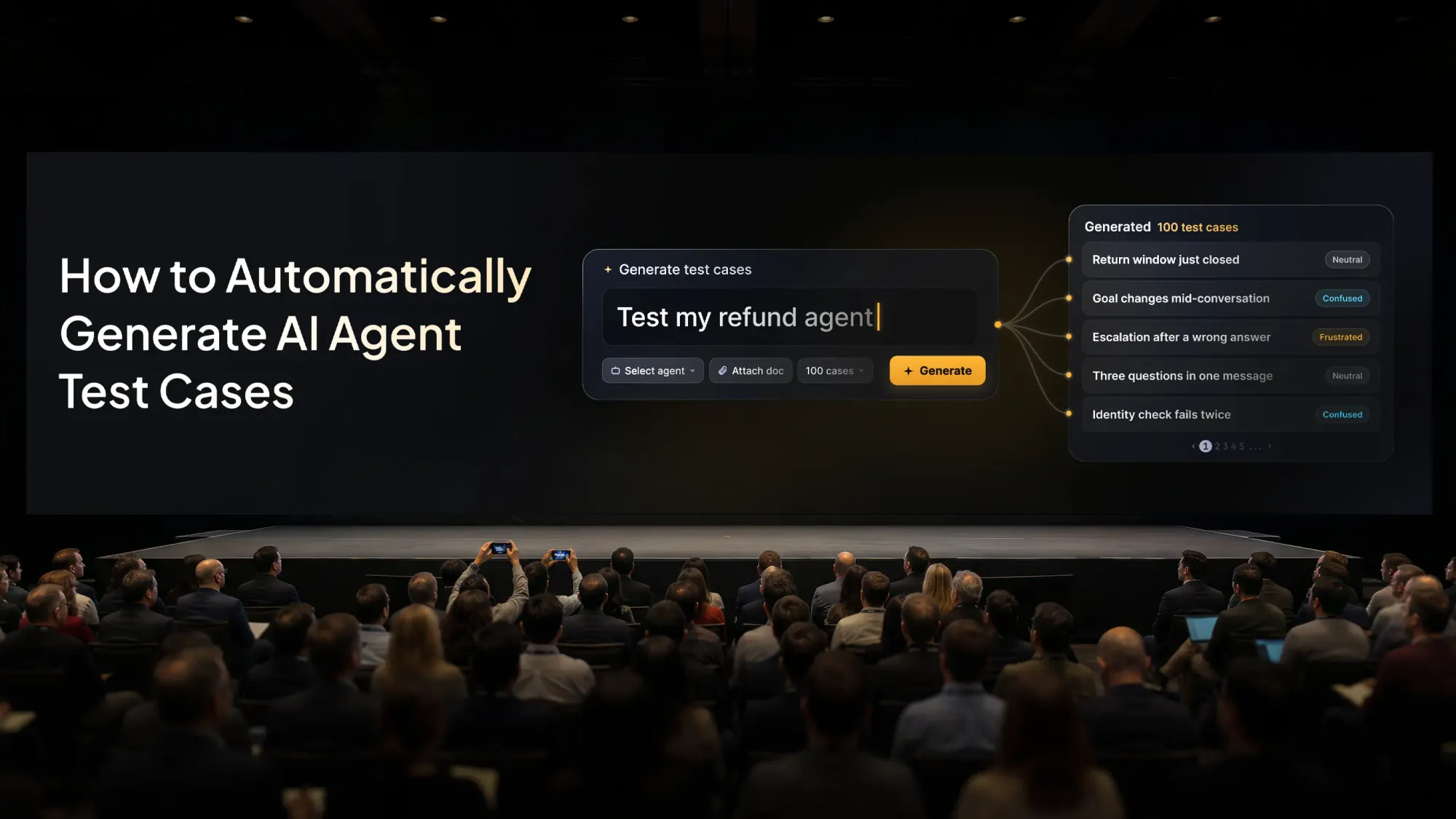
How to Automatically Generate Test Cases with Netra
Netra supports AI-assisted test case generation within its Evaluation platform.
Teams can start with a natural-language prompt or provide additional context for more targeted generation.
The workflow follows six steps.
Step 1: Open the test case generation workflow
Navigate to Netra's Evaluation area and access the AI-assisted test case generation option.
Start by identifying the specific agent capability you want to test, such as refund processing, appointment scheduling, or order cancellations.
Focusing on one workflow makes the generated cases easier to review and validate.
Step 2: Generate test cases using a prompt
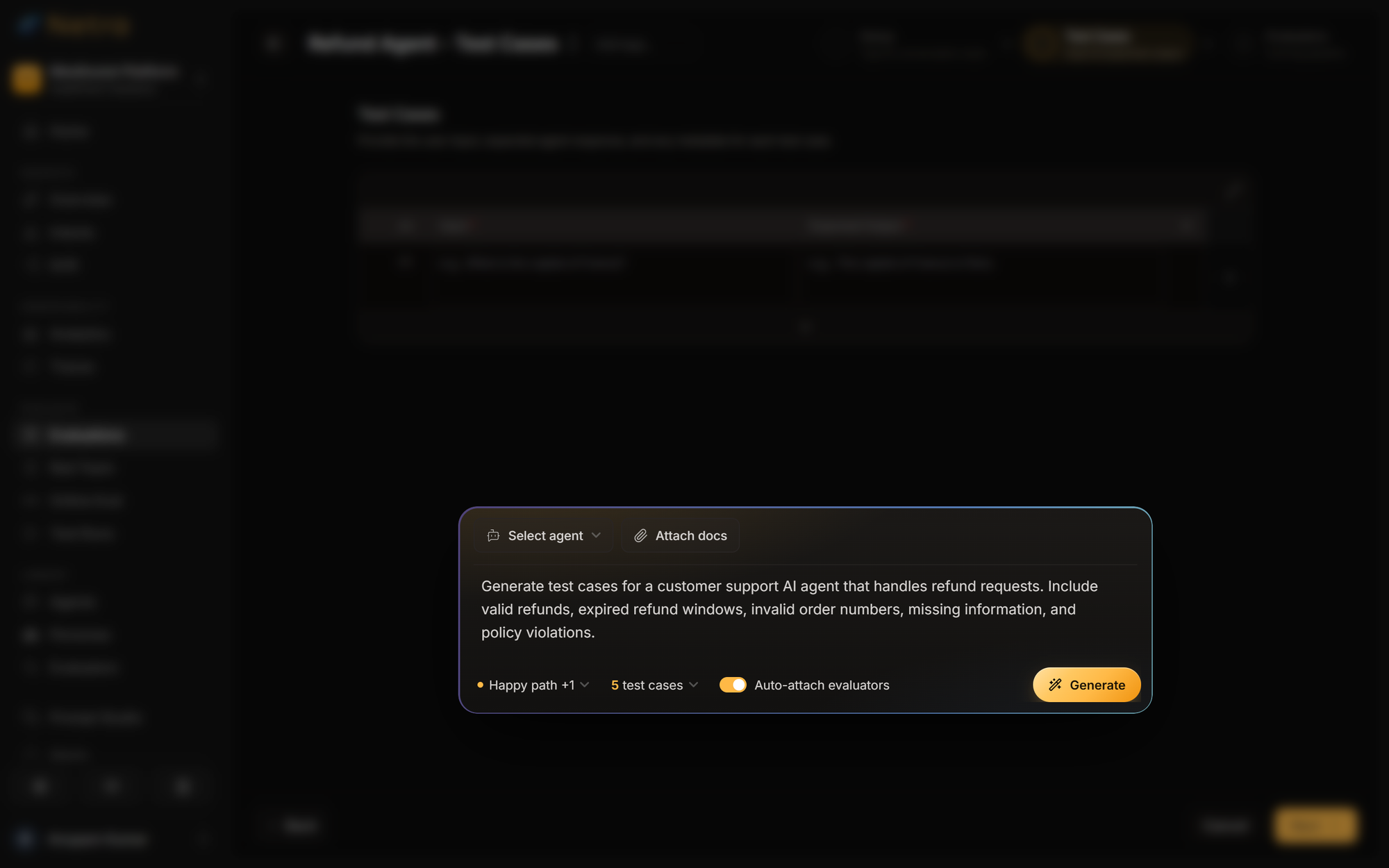
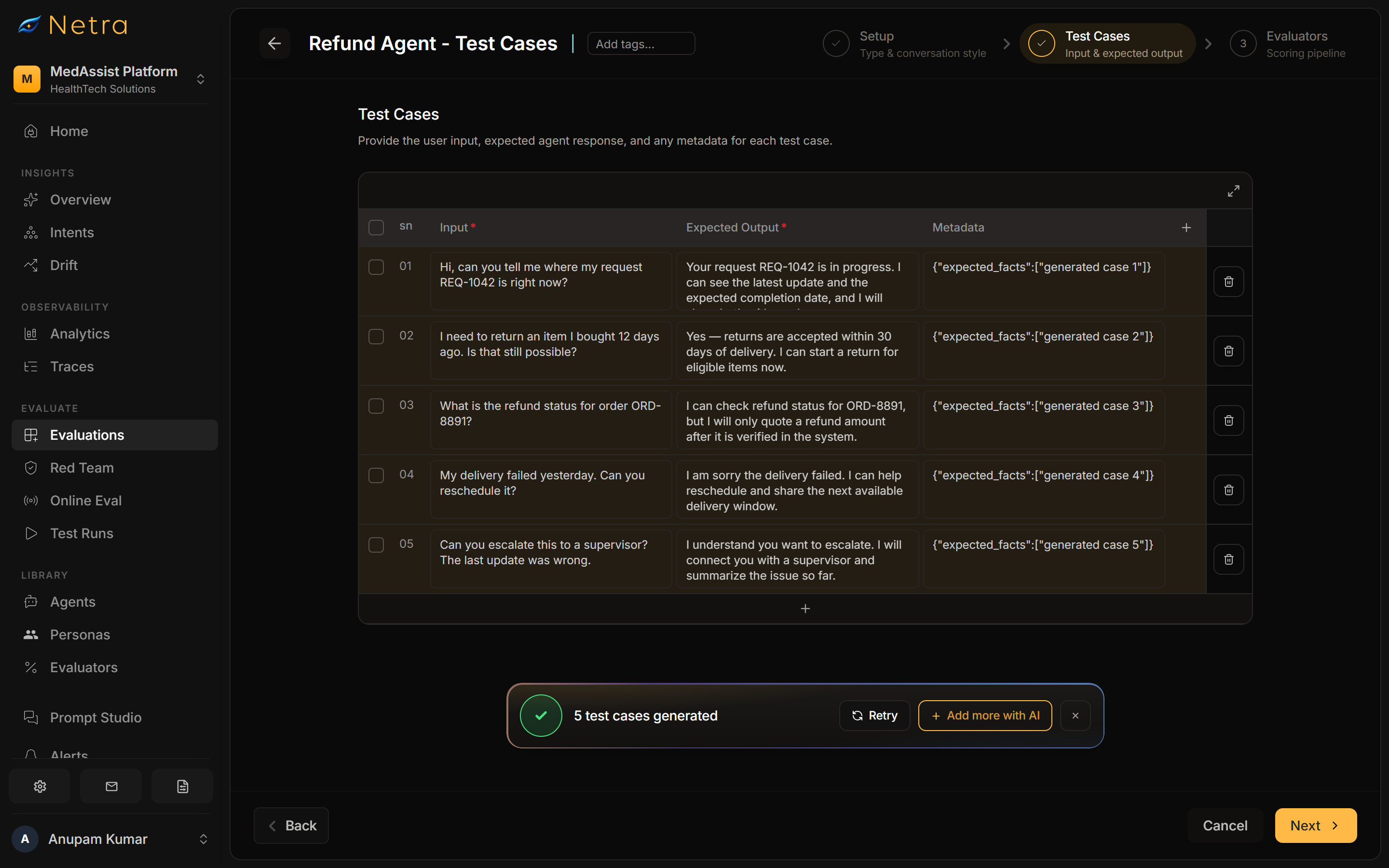
Netra's prompt-based workflow lets you describe the scenarios you want to test.
For example:
Generate test cases for a customer support AI agent that handles refund requests. Include valid refunds, expired refund windows, invalid order numbers, missing information, and policy violations.
The AI test case generator uses these instructions to propose relevant scenarios.
The more specific prompt provides clearer requirements and helps generate cases aligned with the agent's responsibilities.
Step 3: Add documents and agent context
For agents governed by business rules, a prompt alone may not provide enough information.
A refund agent, for example, might follow different policies for subscriptions, damaged products, and digital purchases.
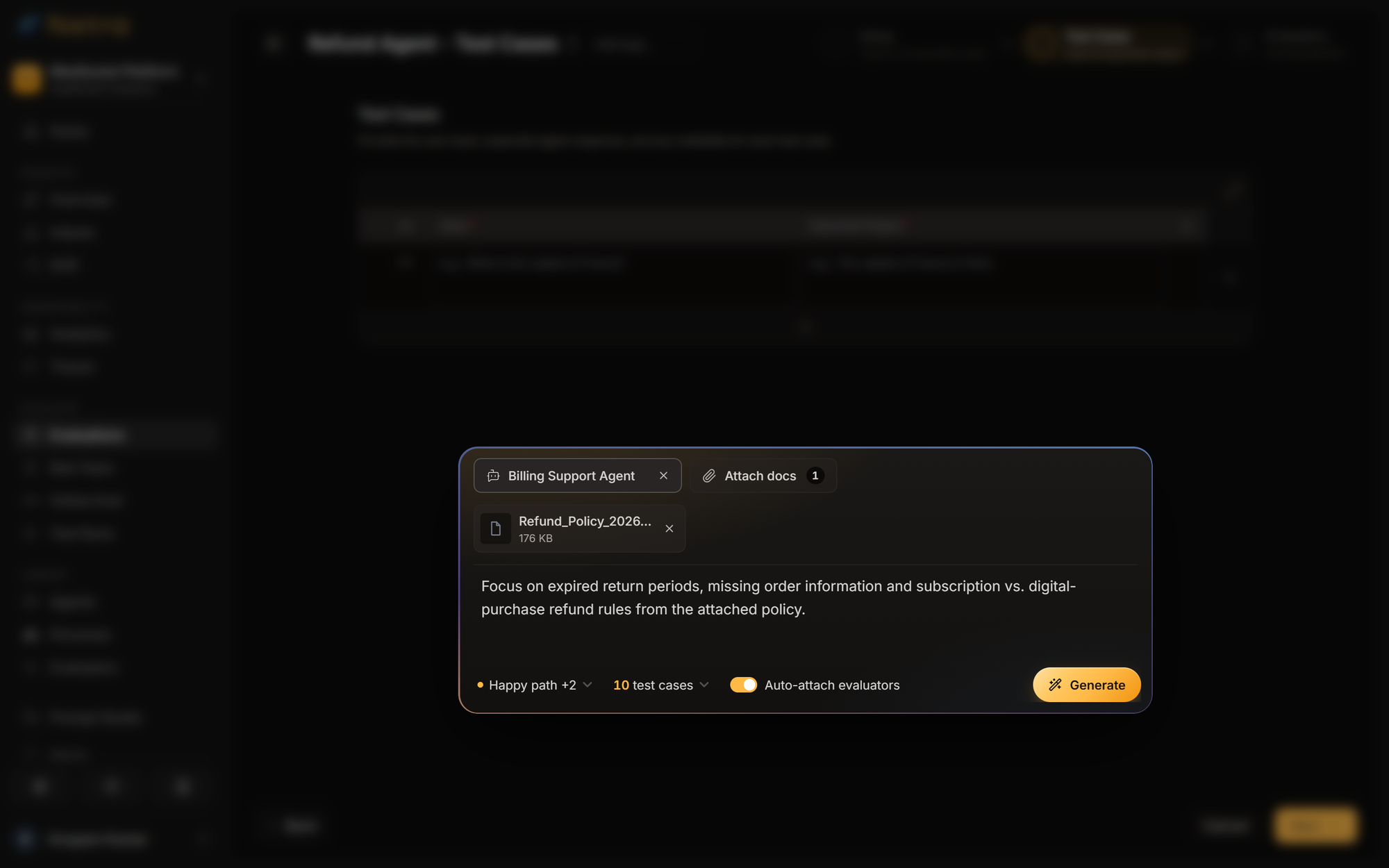
Netra's advanced generation workflow supports:
- Agent selection: Choose the agent to test.
- Supporting documents: Provide relevant policies or reference material.
- Test paths: Specify workflows or behaviors to explore.
- Test-case count: Define how many cases to generate.
For example, teams can select their refund agent, provide the current refund policy, and generate scenarios involving expired return periods and missing order information.
This makes the proposed tests more relevant to the agent's actual requirements.
Step 4: Review the generated test cases
AI-generated test cases are starting points, not automatically verified requirements.
Before using them, check whether they accurately reflect the agent's expected behavior.
Review each case for:
- Correct business rules and policy requirements
- Relevant edge cases and negative scenarios
- Realistic inputs and expected outcomes
- Duplicate or overlapping scenarios
- Sensitive information that should not appear in test data
For example, a generated case might expect a refund after 30 days when the actual policy allows only 14.
That expectation must be corrected before testing.
As PTC explains in its discussion of AI test case generation, AI-generated tests depend on the quality and completeness of the requirements provided.
The value of generated test cases depends on their accuracy and coverage, not simply their quantity.
Step 5: Select evaluators and run tests
Once the cases are reviewed, the next step is measuring whether the agent behaves correctly.
Netra can suggest suitable evaluators for generated test cases. Teams can also configure evaluation criteria based on their requirements.
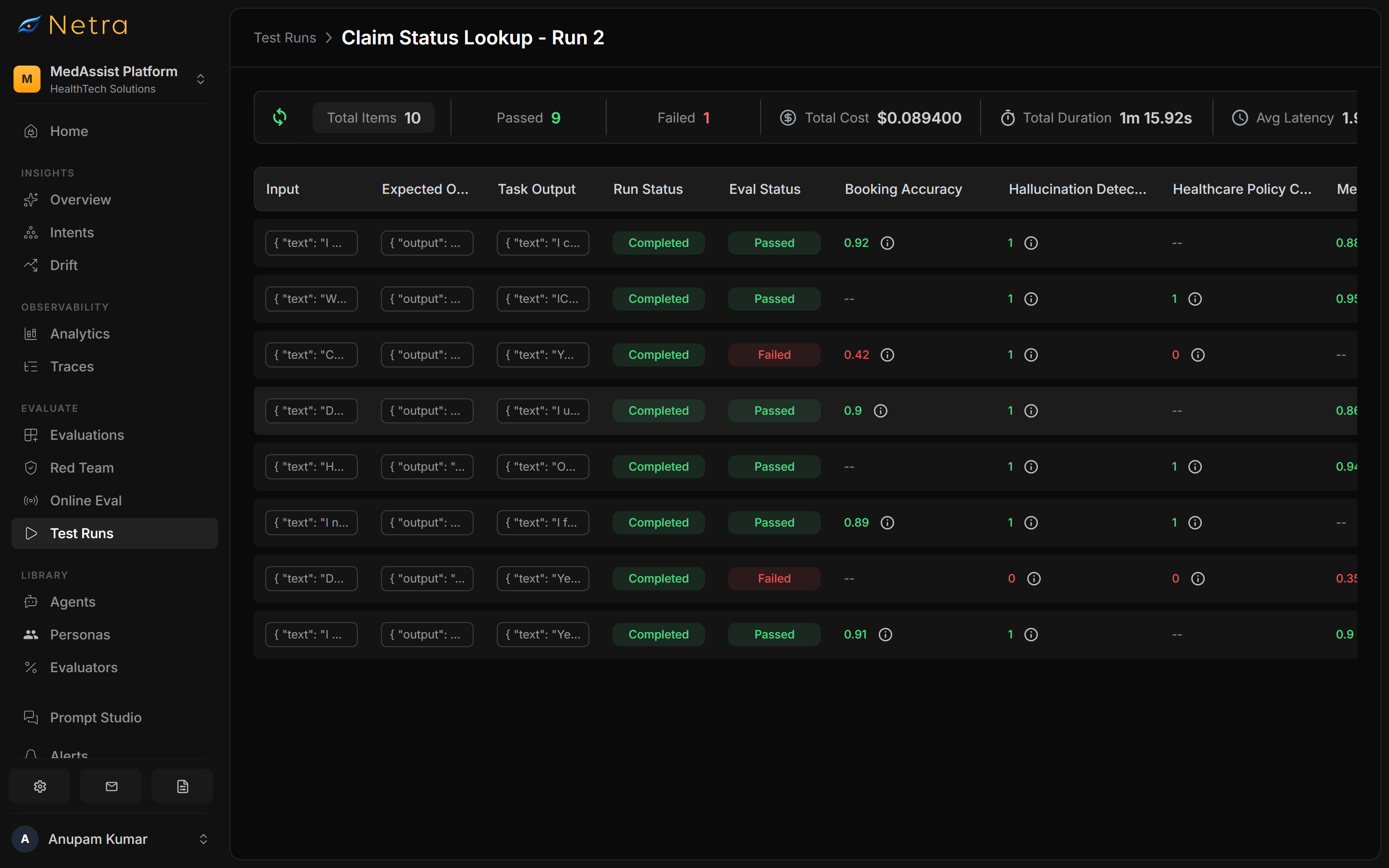
Save the reviewed cases in an evaluation dataset and execute a Test Run.
Netra's evaluation workflow helps teams inspect pass/fail results, evaluator scores, expected versus actual outputs, cost, latency, and execution traces.
Suppose a generated test checks whether an agent rejects a refund outside the permitted period.
If the agent incorrectly approves it, an appropriate evaluator can flag the failure. Engineers can then inspect the associated trace to understand what went wrong.
Step 6: Reuse cases for regression testing
AI agent behavior can change after prompt updates, model upgrades, or modifications to tools and retrieval systems.
Instead of generating a new dataset for every release, reuse reviewed test cases to evaluate changes.
For example, a prompt update might improve how an agent handles incomplete refund requests while introducing errors in policy exceptions.
Running the same evaluation dataset before and after the update helps teams identify such regressions.
Netra's evaluation capabilities support reusable datasets and Test Runs, allowing teams to compare performance across changes.
Automatic test case generation and evaluation capabilities are also available via Netra MCP.
Automatic vs. Manual Test Case Generation
Automatic generation reduces the time required to create test scenarios, but it doesn't eliminate the need for human review.
The strongest approach combines both.
Start with manually verified cases for critical workflows. Use AI to generate additional scenarios, then review and include the relevant ones in your evaluation dataset.
Best Practices for AI-Generated Test Cases
To make AI-generated cases useful for ongoing testing:
- Provide accurate context. Use current instructions, requirements, and reference documents.
- Generate cases by workflow. Keep refunds, bookings, and troubleshooting separate when their requirements differ.
- Include negative scenarios. Test invalid inputs, missing information, unsupported requests, and policy restrictions.
- Validate expected outcomes. Confirm that generated expectations match the agent's actual requirements.
- Avoid duplicate coverage. Prioritize different failure modes over minor variations of the same scenario.
- Reuse production failures. Add real-world issues to regression datasets so future updates can be tested against them.
For agents that handle extended conversations, Netra Simulation can complement generated cases by testing multi-turn interactions, user personas, and real-world scenarios.
Generate Better Test Cases Without Starting from Scratch
An AI agent can perform perfectly on expected requests and still fail when users take an unfamiliar path.
Automatic test case generation helps teams explore those possibilities without manually creating every scenario.
With Netra, engineers can generate test cases from prompts and documents, configure relevant evaluators, and turn the results into reusable regression tests.
The goal isn't to replace thoughtful testing. It's to make comprehensive AI agent testing easier to create and maintain.
Explore Netra's Evaluation Platform or talk to the Netra team to learn how automatic test case generation fits into your testing workflow.
FAQs
How do you generate test cases using AI?
Provide the application's requirements, expected behavior, and workflows. AI test case generation tools can propose scenarios covering normal requests, edge cases, and failure conditions. Review the results, define evaluation criteria, and run the cases against the application.
Can ChatGPT generate test cases?
Yes. ChatGPT can draft test cases from requirements, prompts, or example workflows. However, generated cases require validation. Dedicated AI agent testing platforms such as Netra connect test case generation with evaluators, execution, results, and regression testing.
What is the difference between test case generation and automated testing?
Test case generation creates scenarios for testing. Automated testing executes those cases and checks the results. Netra supports both through generated cases, evaluation datasets, evaluators, and Test Runs.
What should you look for in an AI test case generation tool?
Look for support for application context, edge-case generation, expected outcomes, evaluator integration, reusable datasets, and regression testing. For AI agents, tool-use testing and execution tracing are particularly useful.
Can Netra generate test cases from documents?
Yes. Netra supports a generation workflow that uses supporting documents, agent context, selected test paths, and configurable test-case counts. Teams should review generated scenarios against the original requirements.
Can automatically generated test cases be reused?
Yes. Reviewed cases can be saved in evaluation datasets and rerun after prompt, model, tool, or application changes. Comparing results helps identify regressions and verify improvements.