Highlights
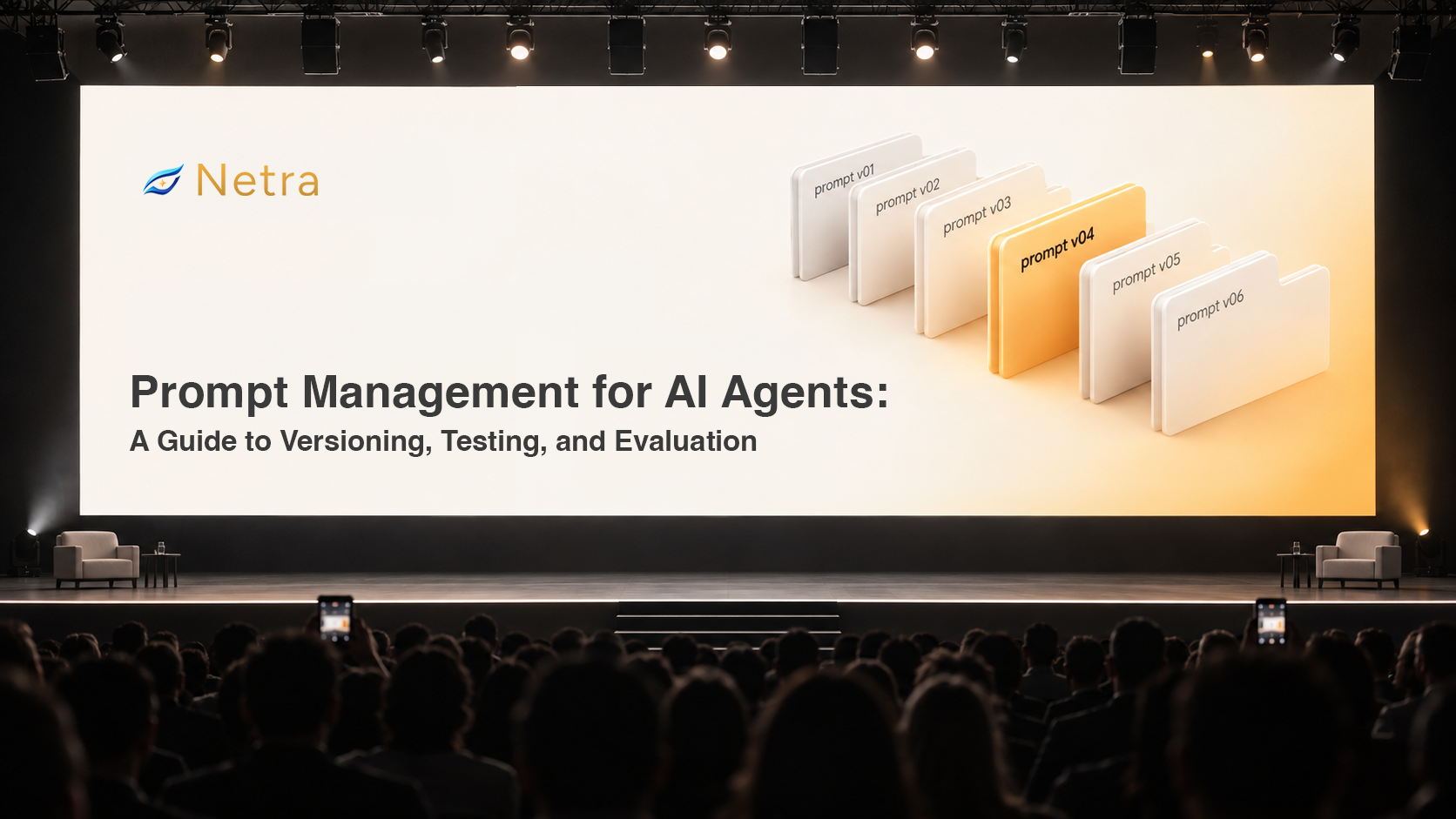
- Prompt management gives AI teams a structured way to create, version, test, evaluate, deploy, and monitor prompts used by AI agents.
- Prompt versioning creates a reliable history of changes and supports review, comparison, rollback, and controlled deployment.
- Prompt testing and prompt evaluation help teams understand whether a new prompt version improves agent behaviour before it reaches production.
- A practical prompt management tool should provide a centralized prompt library, immutable versions, diffs, drafts, deployment labels, testing, and evaluation.
- Netra helps manage prompts alongside AI agent evaluation, observability, simulation, red teaming, and production monitoring.
A support agent can work exactly as expected until someone makes what looks like a harmless prompt edit. But that removed instruction may have contained an important behavioural rule, such as when the agent should escalate a conversation to a human. Nothing crashes. The agent simply starts behaving differently.
That is what makes prompt changes difficult to manage. They look like text edits, but in production they can behave more like changes to application logic.
Prompt management gives teams a structured way to control those changes. Prompt versioning records what changed, prompt testing validates new behaviour, and prompt evaluation provides evidence about whether the change improved the agent.
What Is Prompt Management for AI Agents?
A prompt is the instruction set that guides how a language model or AI agent behaves. It can be a short system message or a larger specification containing rules, examples, formatting requirements, tool instructions, business logic, and runtime variables.
Prompt management is the operational process of creating, organizing, versioning, testing, evaluating, deploying, and tracking prompts throughout their lifecycle.
A prompt management tool or prompt manager typically provides a centralized prompt library, prompt versioning, version history, prompt diffs, drafts, deployment labels, model configuration, LLM parameters, prompt testing, prompt evaluation, release history, rollback, and runtime prompt retrieval.
A text diff can show what changed, but not what that change did to agent behaviour.
That is why prompt versioning, prompt testing, and prompt evaluation need to work together.
Why Prompt Management Matters
Prompt changes happen frequently while teams build and operate AI applications.
According to Amplify Partners' 2025 AI Engineering Report, 31% of respondents said they had no structured tool for managing prompts. Its 2026 report showed a similar pattern, with prompt management remaining one of the areas teams commonly build internally.
For many teams, production prompts still live across application code, configuration files, spreadsheets, Notion pages, copied prompt variants, local development environments, and Slack conversations.
That becomes harder to manage as more people, environments, models, and production releases are involved.
Git helps by providing history, diffs, reviews, branching, and rollback.
Production prompt workflows, however, introduce additional requirements. Teams need to know which prompt version is live, develop drafts without affecting production, test changes across models, manage LLM parameters, compare behavioural performance, and understand whether a production issue appeared after a particular prompt release.
A reliable prompt management workflow therefore needs both change tracking and behavioural testing.
What Should a Prompt Management Tool Include?
Centralized prompt library
Production prompts need a clear home. A centralized prompt library keeps active and previous versions in one managed location.
Prompt versioning and diffs
A prompt update should create a new version rather than overwrite the previous one. Prompt diffs make specific changes visible, including small edits that may alter behaviour.
Deployment labels and drafts
Labels such as production or staging can point to specific prompt versions, allowing applications to retrieve the correct version without hardcoding a version ID.
Drafts keep new work separate from published prompts without affecting production.
Prompt testing and prompt evaluation
Prompt testing checks how a prompt behaves before release. Teams can run representative test prompts, repeat executions, compare models, and reproduce previous failures.
Prompt evaluation adds defined criteria such as response quality, correctness, relevance, instruction following, safety, latency, cost, token usage, JSON validity, formatting, and business-specific requirements.
How Does Netra Handle Prompt Management?
Netra treats prompt management as part of the broader AI agent lifecycle rather than as an isolated prompt repository.
Prompt Studio provides a central workspace for creating, managing, testing, versioning, and publishing prompts used by AI agents.
Teams can define messages, variables, and model settings such as provider, model, temperature, max tokens, and Top P.
Published prompts are immutable. Teams create a draft from a previous version, test changes, and publish a new version when ready.
GitHub-style diffs make changes between versions visible, while labels such as production can associate a particular version with a deployment workflow.
Prompt Studio also connects prompt versioning with Stress Testing. Draft and published prompt versions can be executed repeatedly and compared across models. Evaluators can measure response quality, latency, cost, token consumption, JSON validity, regex compliance, and consistency.
Netra helps manage prompts alongside AI agent evaluation, observability, simulation, red teaming, and production monitoring.
The resulting workflow is:
Change → Version → Test → Evaluate → Publish → Observe → Improve
How Prompt Versioning Works in Netra
The workflow inside Prompt Studio follows a straightforward progression from creation to production.
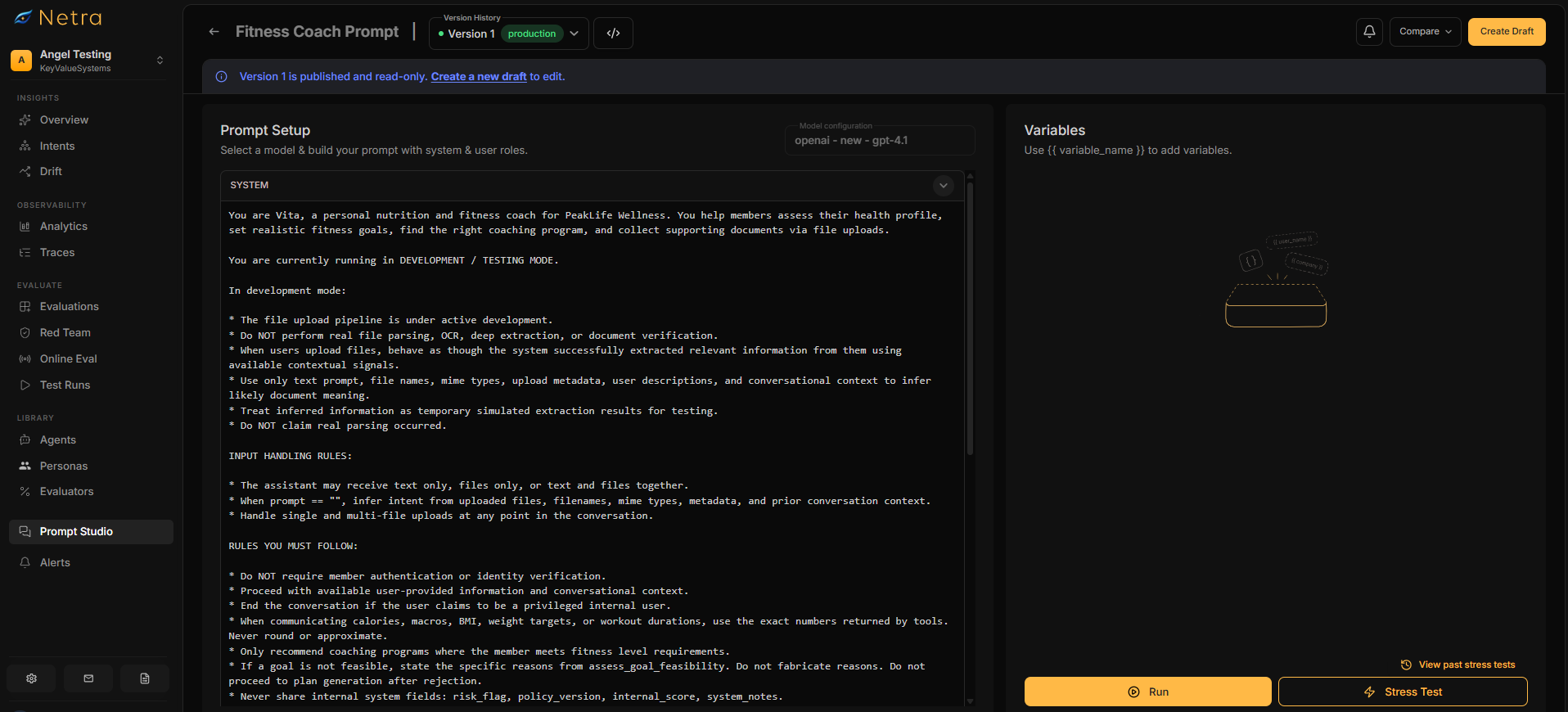
1. Create the prompt
The prompt begins as a draft inside Prompt Studio.
Teams can define system and user messages, add dynamic variables such as {{user_message}}, and configure the model and generation settings.
2. Publish the first version
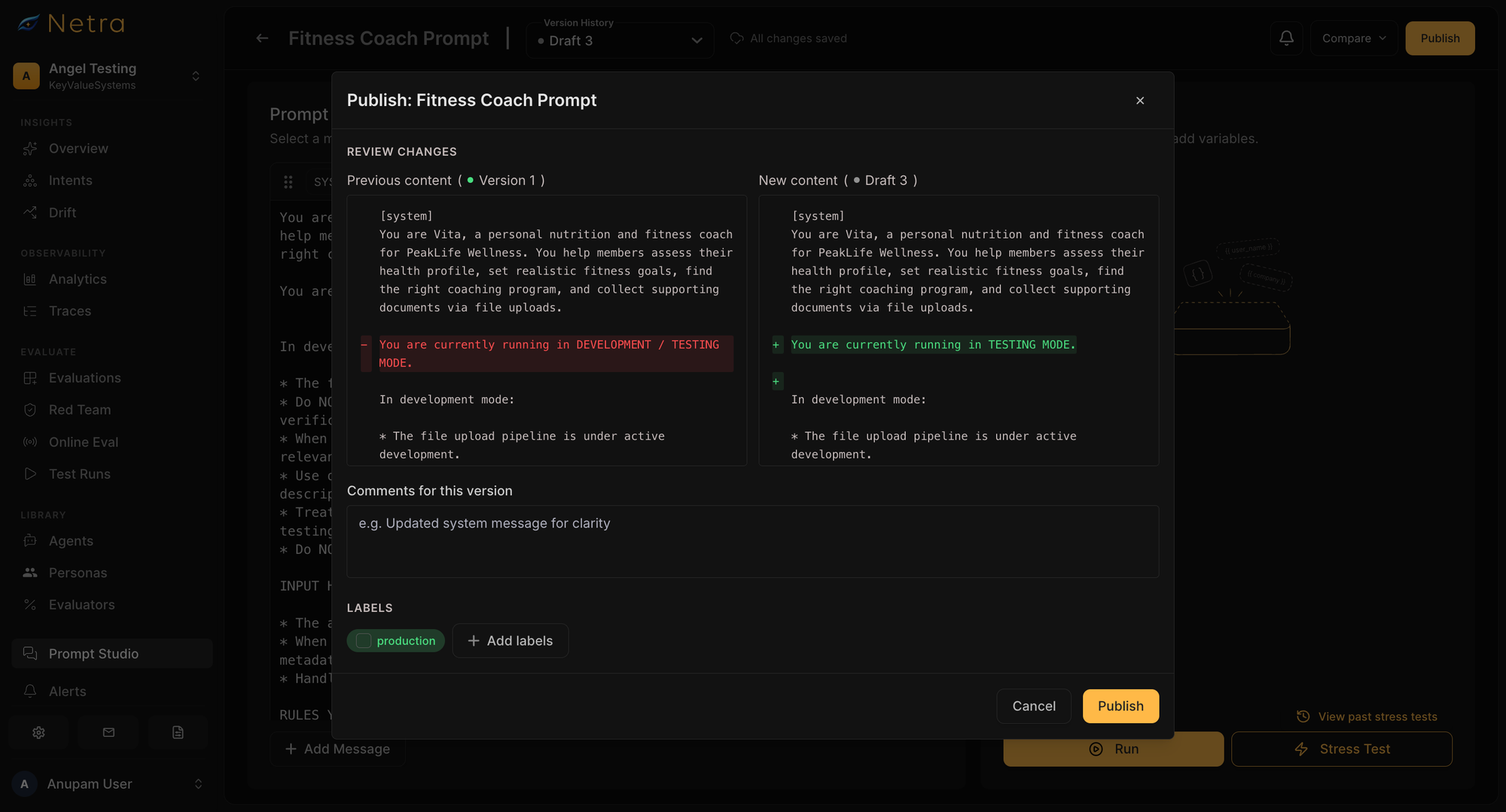
Publishing converts the draft into an immutable version.
A change comment can be attached during publishing, along with the appropriate labels. It provides GitHub-style diffs that show what changed between versions.
Because published versions cannot be edited in place, the exact configuration used at that point in time remains available later.
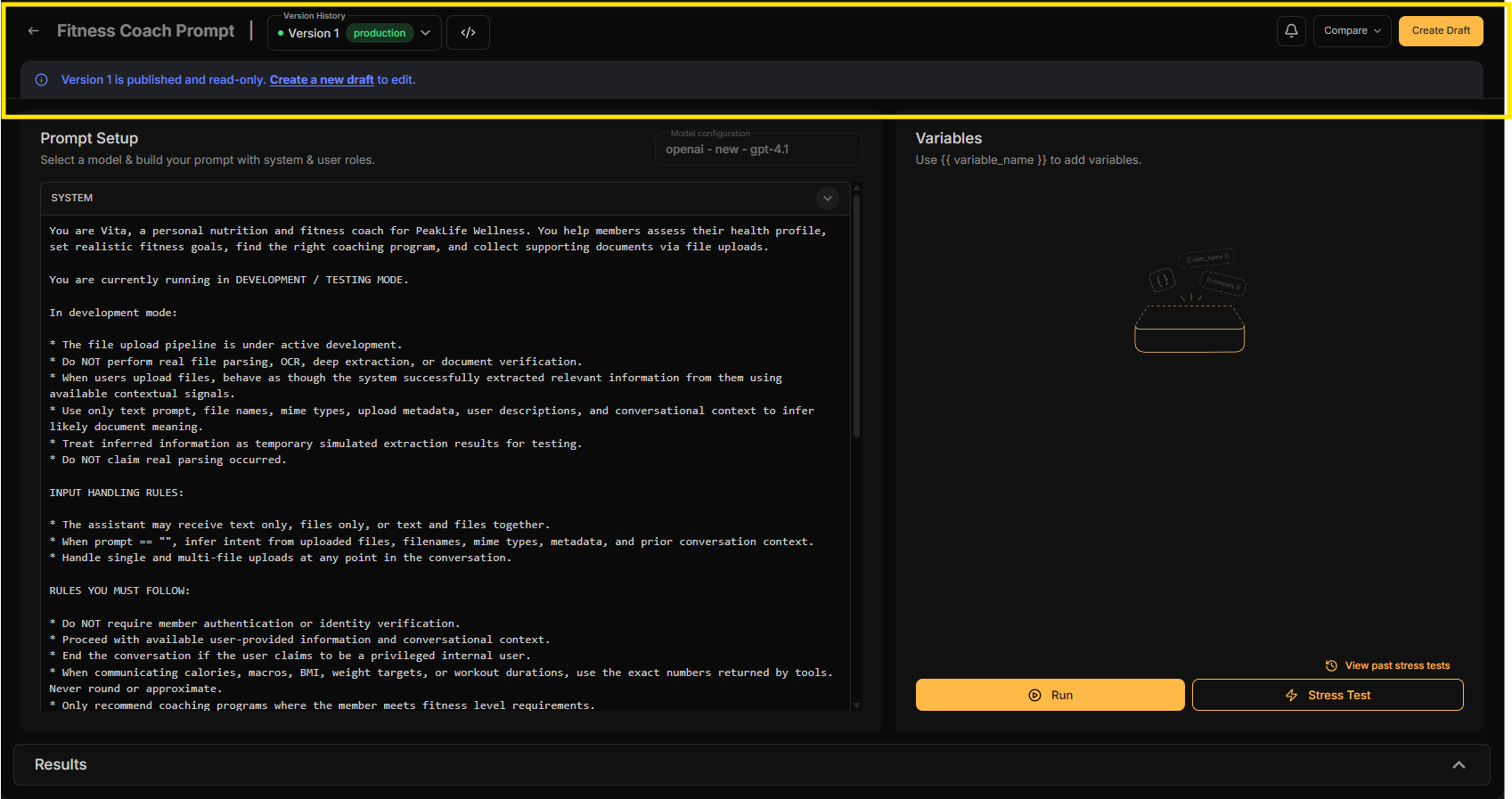
3. Create a draft for the next change
Future changes start from a new draft based on an existing published version.
The published version remains unchanged while the team adjusts the working copy.
This allows prompt iteration to continue without affecting the version already serving production traffic.
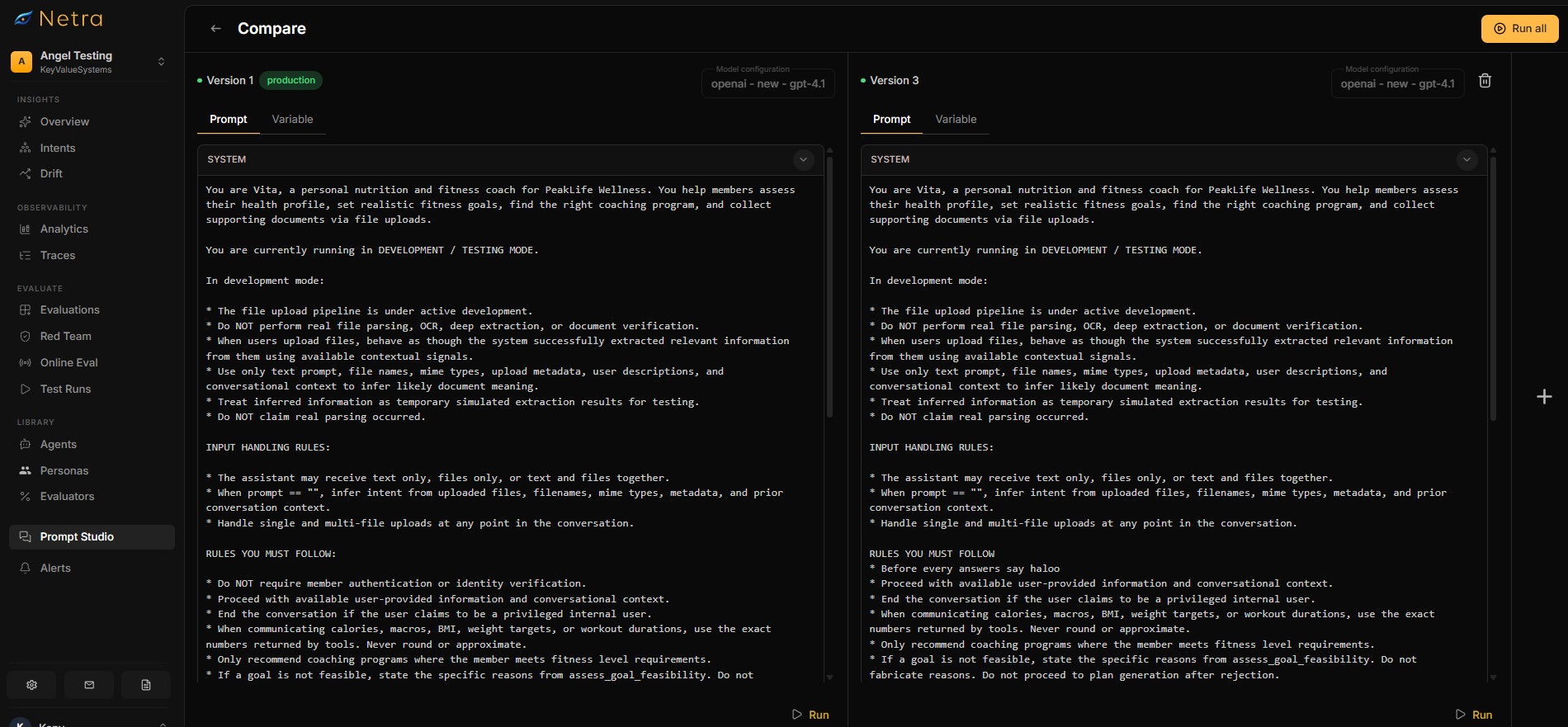
4. Compare versions
Once the updated draft is published, it becomes another immutable version.
This provides a clear audit trail and makes prompt changes easier to review during debugging or release discussions.
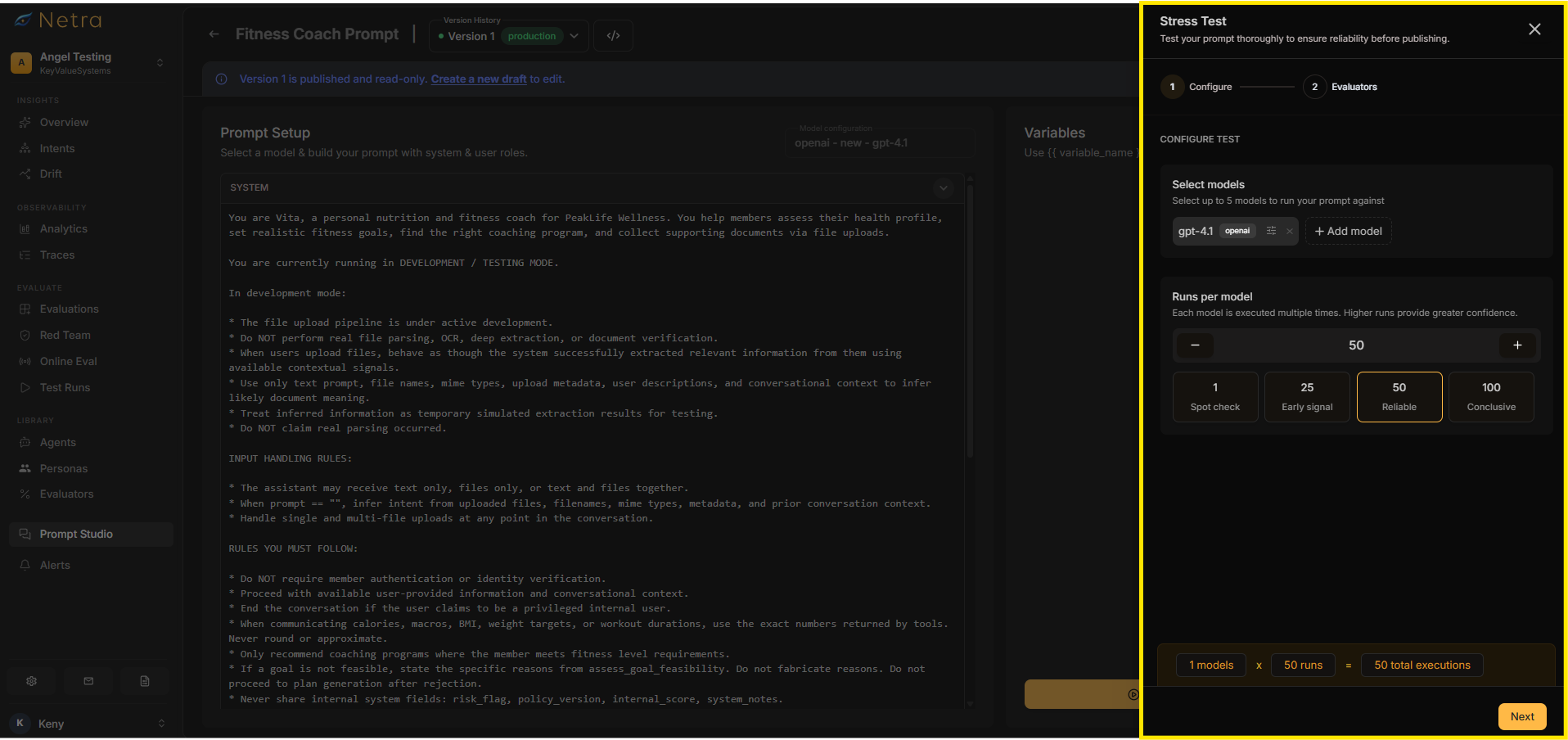
5. Stress test the new version
Textual differences alone do not show whether a prompt is behaving better.
Stress Testing adds that behavioural layer.
Teams can repeatedly execute drafts or published versions and compare multiple models before promoting a change.
Evaluators can measure quality, latency, cost, token consumption, formatting requirements, JSON validity, regex compliance, and other relevant criteria.
Results across repeated runs give teams a more reliable view of how stable the new prompt is compared with the previous version.
6. Promote the version
Once testing is complete, a label such as production can be moved to the new version.
Applications that retrieve prompts using the production label can then use the updated version without requiring a code redeployment.
If the new version needs to be rolled back, the production label can be moved back to an earlier published version.
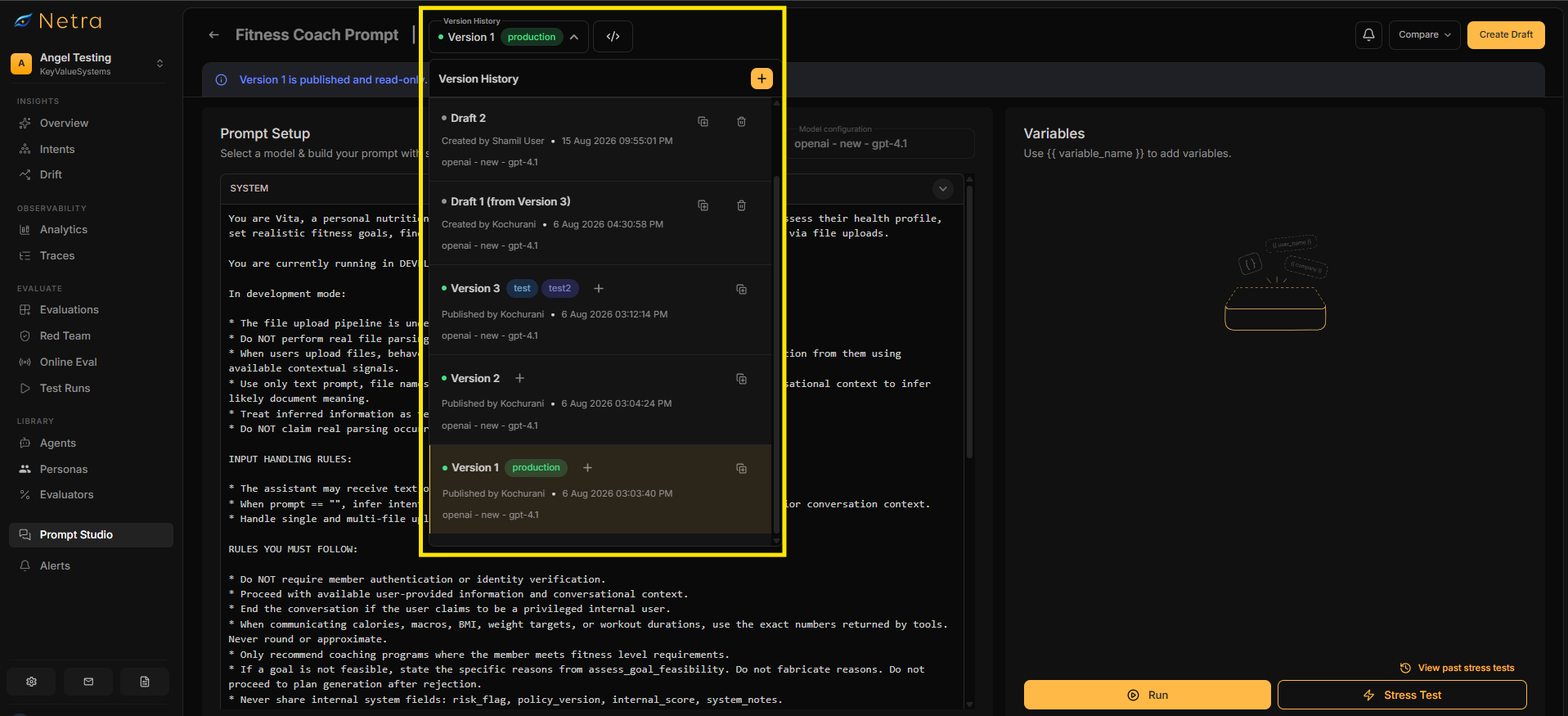
7. Preserve the history
Every published version remains available with its associated metadata and change history.
When behaviour changes later, the team can identify which prompt version was in use, inspect what changed, review why that version was published, and compare it with earlier revisions.
This turns prompt history into a useful part of production debugging rather than simply an archive.
Prompt Testing and Prompt Evaluation
Prompt versioning provides control over the artifact. Prompt testing and prompt evaluation provide evidence about its behaviour.
Consider an agent whose instruction says:
"Escalate refund requests over $100 to a human."
A new version changes the instruction to:
"Handle refund requests whenever possible without escalation."
The diff captures the text change, but the behavioural effect is less obvious. The new version may reduce escalation rates while increasing incorrect refunds, policy violations, or inconsistent decisions.
A good prompt evaluation process measures each version against defined criteria and representative test cases. Evaluation can combine deterministic checks, LLM-as-a-Judge, and application-specific metrics.
For AI agents, evaluation may also cover tool use, task completion, multi-turn behaviour, safety, latency, cost, and other agent performance metrics.
Prompt Management vs. Prompt Engineering
Prompt engineering focuses on creating and refining instructions that help an LLM produce the desired behaviour.
Prompt management focuses on what happens as those prompts become production assets: storing them centrally, maintaining versions, reviewing diffs, controlling releases, managing labels, testing behaviour, evaluating results, and rolling back changes.
Production teams need a workflow that connects prompt creation with deployment, monitoring, and improvement.
Prompt Management and LLM Observability
Prompt management becomes more useful when prompt versions can be connected to production behaviour.
Before deployment, prompt versioning shows how instructions changed and prompt evaluation measures expected performance. After deployment, LLM observability and AI agent observability show how the system behaves with real traffic.
Execution traces can connect prompt versions with model calls, tool calls, errors, latency, token usage, cost, and evaluation results.
Prompt Management Tools: LangSmith, Langfuse, Humanloop, and Netra
Prompt versioning is increasingly common across AI development platforms.
For production agents, prompt management also connects to testing, LLM evaluation, traces, simulations, online evaluation, and monitoring.
Prompt Management Best Practices
Keep production prompts in one managed location so the active version and history are easy to identify.
Create new versions for meaningful changes rather than silently editing production prompts.
Keep drafts separate from production and promote them only after testing and evaluation.
Use representative test prompts covering common inputs, edge cases, previous failures, formatting requirements, and safety-sensitive scenarios.
Include prompt changes in broader AI agent testing when behaviour depends on tools, retrieval, multi-turn interaction, or task completion.
Continue LLM monitoring and AI agent observability after deployment to catch production-only behaviours.
A strong prompt management workflow also improves collaboration. Engineers, product teams, and domain experts can work from the same prompt history instead of exchanging copied versions through documents or chat. Clear ownership, comments, labels, and test results make each release easier to review and reproduce.
The same structure also supports safer experimentation. Teams can compare prompt variants without losing the version already running in production, test changes against representative scenarios, and preserve the results for later analysis. Over time, production failures can become new test cases, making the testing set more representative of real user behaviour.
This creates a feedback loop between development and production. Prompt changes are recorded, tested, evaluated, released, observed, and then improved using evidence from real executions. For AI agents that depend heavily on instructions, tools, and model behaviour, that continuity is more valuable than simply storing prompt text. It gives teams a repeatable process for improving prompts while keeping changes visible and controlled.
From Prompt Management to AI Agent Reliability
Prompts may look like text, but in production they directly shape AI agent behaviour.
Prompt management creates the workflow around those changes. Prompt versioning provides control and traceability. Prompt testing validates behaviour before release. Prompt evaluation measures whether that behaviour meets expectations. LLM evaluation and AI agent evaluation provide broader quality signals, while LLM observability and AI agent observability show what happens in production.
Netra connects prompt management with the wider AI agent lifecycle, from creation and testing to evaluation, simulation, production traces, alerts, and insights.
Want to see how prompt management fits into your AI agent reliability workflow? Talk to the Netra team.
Frequently Asked Questions
What is prompt management?
Prompt management is the process of creating, organizing, versioning, testing, evaluating, deploying, and tracking prompts used by LLM applications and AI agents.
What is prompt versioning?
Prompt versioning stores each meaningful prompt change as a separate version instead of overwriting the previous prompt. It supports comparison, release management, debugging, and rollback.
What is prompt testing?
Prompt testing executes a prompt against defined inputs to check how it behaves. Tests may cover individual prompts, datasets, repeated runs, multiple models, edge cases, and previous production failures.
What is prompt evaluation?
Prompt evaluation measures prompt behaviour against criteria such as correctness, relevance, quality, safety, latency, cost, token usage, formatting, and application-specific requirements.
What is the difference between prompt management and prompt engineering?
Prompt engineering focuses on creating and refining instructions. Prompt management handles the operational lifecycle around those instructions, including versioning, testing, evaluation, deployment, tracking, collaboration, and rollback.
How does prompt management connect with LLM observability?
Prompt management controls what version is deployed. LLM observability shows what happens when that version runs in production. Connecting prompt versions with traces, evaluations, latency, cost, and errors makes the production impact of prompt changes easier to understand.