Highlights
- Your AI coding assistant gets Netra instrumentation wrong. Not because it's broken, but because it lacks the right context. Netra Skills fills that gap.
- Netra Skills drops ready-made AI agent observability patterns straight into your coding assistant, so you get correct instrumentation from day one instead of fixing it two days later.
- One command installs everything and auto-detects your IDE. What used to take hours of ramp-up now takes 60 seconds.
Here's a situation most AI engineers have lived through.
You're building a new feature, you decide it's time to add proper observability, and you open your AI coding assistant — Cursor, Claude Code, Windsurf, whatever your tool of choice is. You type something like: "Help me set up Netra tracing for this FastAPI app."
What comes back is... fine. Mostly. The assistant cobbles together something that looks reasonable, but the context tracking is missing, the tenant ID isn't wired up correctly, and two days later, you realize the spans you're seeing in the dashboard don't match your real agent workflow. You spend the afternoon fixing the mess.
This isn't a flaw in your coding assistant. It's a gap in how it was set up. It had no way to know what good Netra instrumentation actually looks like in production.
That's the problem Netra Skills are designed to solve.
What are Netra Skills?
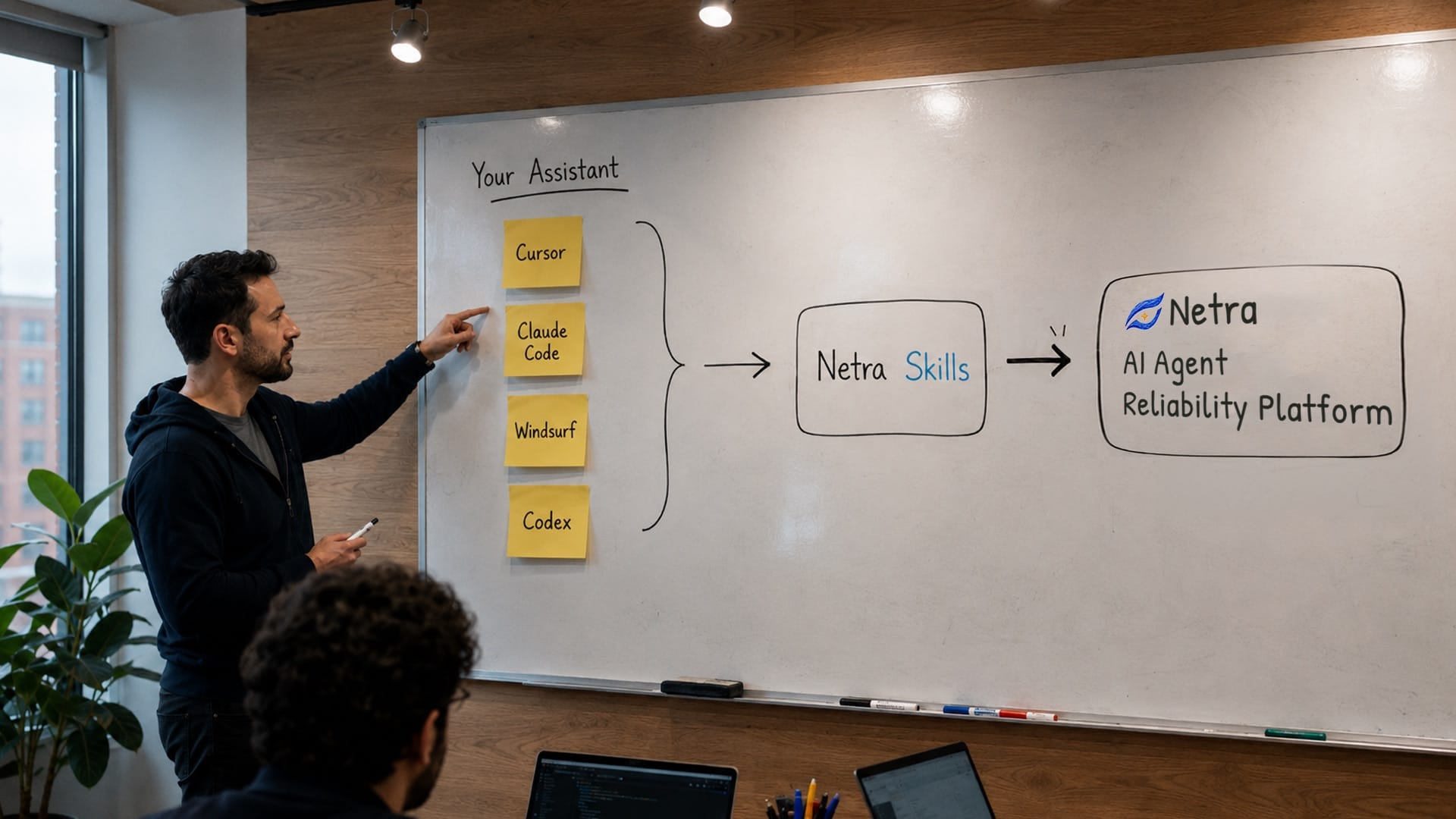
Netra Skills are ready-made instrumentation patterns and best practices for AI agent observability, dropped straight into your AI coding assistant.
Think of them as a cheat sheet that your coding assistant reads before helping you write any Netra-related code. Instead of guessing about how to initialize the SDK, structure spans, track user context, or set up evaluations, your assistant now works from battle-tested patterns that come from real production deployments.
Skills work with the tools you're already using: Cursor, Claude Code, Windsurf, Antigravity, and Codex. Once installed, they load automatically — you don't call them explicitly, you don't change how you prompt. Your assistant just gets smarter about Netra after that.
There are two Skills available right now:
netra-best-practices — The end-to-end skill. It covers SDK initialization for Python and TypeScript, context tracking (user IDs, session IDs, tenant IDs), trace debugging, instrumentation strategy choices, cost and usage tracking, evaluations, multi-turn simulations, and using the Netra MCP tools for trace analysis. If you're doing anything serious with Netra, this is the one you want.
netra-mcp-usage — A targeted skill for teams using Netra's MCP (Model Context Protocol) server to query traces directly inside their IDE. Covers the exact schemas and query patterns for netra_query_traces and netra_get_trace_by_id — the two tools that let you pull observability context into your editor without switching tabs.
netra-mcp-usage — A targeted skill for teams using Netra's MCP (Model Context Protocol) server to query traces directly inside their IDE. Covers the exact schemas and query patterns for netra_query_traces and netra_get_trace_by_id — the two tools that let you pull observability context into your editor without switching tabs.
Why they matter (Or: The cost of starting from scratch every time)
Setting up AI agent observability isn't complicated in theory. In practice, it has a lot of small decisions that add up:
- How do you initialize the SDK correctly for your stack?
- When do you use auto-instrumentation versus decorators versus manual spans?
- Where does tenant_id get attached — at the request level, the span level, or both?
- How do you connect your production traces back to your evaluation datasets?
- What's the right pattern for a multi-turn simulation that mirrors how real users behave?
None of these are hard questions once you know the answers. But figuring them out the first time — or explaining them to an AI assistant that's working blind — takes hours. Most teams end up with instrumentation that works-ish but has gaps: spans that don't capture the full context, cost tracking that breaks when tenants are added, and evaluation runs that don't connect to the traces that triggered them.
Netra Skills cuts that ramp-up entirely. The answers to all those questions are already in there. When you ask your coding assistant to help you add observability, it's working from a pattern that has been tested in real production running millions of spans per day — not from what it can piece together from docs it may have never seen.
The result is instrumentation that's correct from the start, not corrected after the fact.
How they work
Netra Skills uses the skills standard, which is a way of giving AI coding assistants focused context about specific tools and workflows. When you install a Netra Skill, it drops an instruction file into the right place for your specific coding assistant — Cursor reads it from .cursorrules or .cursor/rules, Claude Code reads it from CLAUDE.md, and so on. The CLI handles all of that automatically.
From that point, whenever you're working on anything related to Netra, your assistant works from those instructions. It knows the correct initialization pattern. It knows when to use @workflow, @agent, and @task decorators versus manual spans. It knows how to wire up netra_query_traces with the right filter schema. Nothing changes about how you ask, and you get the correct code back.
No plugins. No configuration file to maintain. No special prompt syntax.
Getting started: 60 seconds to better instrumentation
Install both Skills (recommended) with one command:
npx skills add KeyValueSoftwareSystems/netra-skillsThe CLI will detect which agentic interfaces you have installed and place the skill files in the correct location automatically. If you only want one:
# For SDK setup, evaluation, and full observability patterns
npx skills add KeyValueSoftwareSystems/netra-skills --skill netra-best-practices

# For MCP trace querying inside your IDE
npx skills add KeyValueSoftwareSystems/netra-skills --skill netra-mcp-usage
That's it. Restart your editor if prompted, and your coding assistant now has the full Netra instrumentation context.
What you can do with these skills
Here's what changes once the Skills are installed:
Setting up a new project takes from 30 minutes to 5 hours. Your assistant knows the exact three-line initialization for Python (FastAPI + OpenAI) and TypeScript (Express + OpenAI), including environment variable handling and SDK version compatibility.
Context tracking is correct by default. The skill includes the right pattern for attaching user_id, session_id, and tenant_id to every span — which matters a lot for debugging. Without these, traces in the dashboard are a nightmare to filter by the user or customer you're investigating.
Instrumentation choices get clearer. The skill explains the simple rule: use auto-instrumentation if you're running LangChain, LangGraph, CrewAI, or another supported framework and just need to capture what's happening. Use decorators (@workflow, @agent, @task) when you want to add structure and naming to your traces. Use manual spans when you need precise control over a specific operation. Your assistant can now explain this trade-off in context and suggest the right approach for your codebase.
Evaluation setup doesn't require doc rabbit holes. The netra-best-practices skill covers how to build a dataset from production traces, wire up an evaluator, and run a test suite against it — including the multi-turn simulation setup that catches issues unit tests never will.
Trace debugging inside the IDE finally works. The netra-mcp-usage skill includes the exact schema for netra_query_traces filter inputs — something that's easy to get wrong and frustrating to debug when you do. Ask your assistant to find traces from a specific user, time window, or error condition, and it will get the query right.
Who gets the most value from this
Teams just starting with Netra get the biggest win: zero ramp-up time on instrumentation patterns. You can go from pip install netra-sdk to proper production traces in the same session, without reading through the full documentation first.
Teams who already have Netra set up see the value when they grow — adding a new agent, onboarding a new engineer, or adding multi-tenancy to an existing product. The skill means any new engineer on the team can write correct observability code without sitting them down to explain everything.
Teams using Netra MCP for IDE-integrated debugging get the most from netra-mcp-usage. Querying traces directly from inside Cursor or Claude Code is one of Netra's most practical features for active debugging — but the MCP query API is strict enough that most coding assistants get the filter schema wrong without guidance. The skill fixes that.
The bigger picture
Skills are part of Netra's philosophy to make AI agent observability as frictionless as possible. The two-line SDK initialization, the auto-instrumentation that covers 12+ frameworks with zero code changes, the MCP server that brings traces into your IDE — all of these are built around the same idea: observability should be something you add in one session and then have forever, not something you patch up over weeks of debugging.
Skills extend that to your AI coding assistant. The barrier to correct instrumentation is no longer knowing what correct looks like. Now it's just one command.
Quick reference
| COMMAND | WHAT IT DOES |
|---|---|
npx skills add KeyValueSoftwareSystems/netra-skills
|
Installs both Skills, auto-detects your IDE |
npx skills add KeyValueSoftwareSystems/netra-skills --skill netra-best-practices
|
SDK setup, context tracking, evaluation, simulation |
npx skills add KeyValueSoftwareSystems/netra-skills --skill netra-mcp-usage
|
MCP trace query patterns for IDE debugging |
Skills work with: Cursor, Claude Code, Windsurf, Antigravity, Codex.
Full documentation: docs.getnetra.ai/mcp/skills
FAQs
1.Do I need to install both Skills or just one?
For most teams, start with netra-best-practices — it walks through the full workflow from SDK setup to evaluation. Add netra-mcp-usage if you're actively using the Netra MCP server to query traces inside your editor. If you're not sure, the single install command (npx skills add KeyValueSoftwareSystems/netra-skills) installs both and takes 10 seconds.
2.Does this work with my current coding assistant?
Netra Skills are compatible with Cursor, Claude Code, Windsurf, Antigravity, and Codex. The CLI detects which ones you have installed and drops them in the right spot. If you're using a different assistant, you can look at the skill files and manually place them where your tool expects to find context.
3.Do I need to be using Netra MCP to benefit from the Skills?
No. The netra-best-practices skill covers the full SDK workflow and doesn't need MCP. The netra-mcp-usage skill is specifically for teams using the MCP server — if you haven't connected it yet, start with best-practices.
4.Will the Skills stay up to date?
Skills are maintained in the KeyValueSoftwareSystems/netra-skills repository. Running the install command again will pull the latest version. As Netra adds new capabilities — new instrumentation frameworks, evaluation patterns, simulation configs — the Skills will be updated to reflect them.
5.What if my coding assistant produces wrong Netra code even with the Skills installed?
First, check that the skill file is in the right location for your tool (restart your editor after installation). If the issue persists, the most useful feedback is a specific example of what was generated incorrectly — the Netra team maintains the Skills based on real usage patterns, and reports of incorrect output directly improve the content.
Netra is an AI agent observability, evaluation, and simulation platform. Start for free — no credit card required — or book a demo to see how it works.